EpicNPC

Register a free account today to become a member!

Official Suggestion thread - help make EpicNPC a better marketplace

Not Recently Bumped
How about a "shop" option on profile? I mean when you visit a profile, you will see a list of items that is listed for selling/buying by that person. Right now if you visit a profile, there is no option to differentiate his threads for selling/buying. We see all threads together like where that user commented. It's just kind of mixed up.

Another one I wanted to say what about adding a "Price" column in forum listings, If you want to see the price now, either you need to open the thread or the seller needs to mention the price in the title. So it would be great if we could see what the product's price is from the listings directly. Thanks
 
How about a "shop" option on profile? I mean when you visit a profile, you will see a list of items that is listed for selling/buying by that person. Right now if you visit a profile, there is no option to differentiate his threads for selling/buying. We see all threads together like where that user commented. It's just kind of mixed up.
If you go to someone's profile and select "Find All Threads" that should show the data you want. Seller's should be using the "Buying" and "Selling" prefixes to easily distinguish between the two.


Another one I wanted to say what about adding a "Price" column in forum listings, If you want to see the price now, either you need to open the thread or the seller needs to mention the price in the title. So it would be great if we could see what the product's price is from the listings directly.

Members are able to post many accounts in a thread or offer many services, so having one prices would not make sense in many threads. However we already require a price for sellers that use Trade Guardian. Perhaps we can display prices for these threads only. I'll consider this change in a future TG update.
 
can you add option to delete my own posts somehow?
ie in my old ESO topic from 2016 i have a bunch of useless BUMP posts at first pages, at the times when bump system was not introduced yet i believe

wanna to get rid of them xD
 
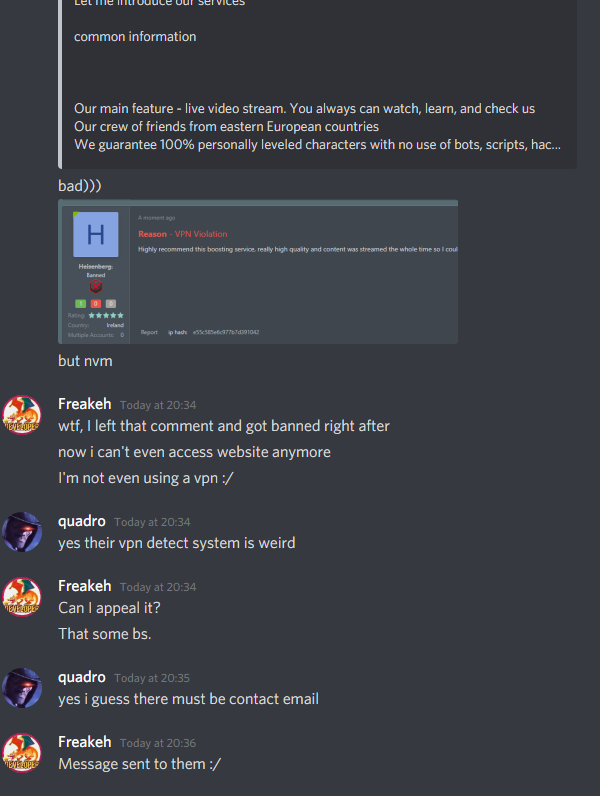
also can you please improve your VPN detect system?
like every 5th of my customers got banned immediatly after they left feedback....
its frustrating for them, and looks not very good for my topics, where other potential customers can see feedbacks from banned users


5fAifMO.png
 
hello,

Would be nice to have an option to hide thread. Instead of close. I.e i need a few weeks break. Don't want to people writing to me while i am offline. Hide / un hide would be perfect.
 
hello,

Would be nice to have an option to hide thread. Instead of close. I.e i need a few weeks break. Don't want to people writing to me while i am offline. Hide / un hide would be perfect.
I think you can just change your thread title to notify users and if you don't bump it to the first page there's less exposure anyway, so less people should contact you.
 
where is that? top right its #number of a post for me
delete.jpg

also can you please improve your VPN detect system?
like every 5th of my customers got banned immediatly after they left feedback....
He needs to contact support. The ban is justified.

Members banned for VPN violation can unban themselves now by turning it off and clicking a "retry" button, so this should not be a major issue unless there's another problem.

Would be nice to have an option to hide thread. Instead of close. I.e i need a few weeks break. Don't want to people writing to me while i am offline. Hide / un hide would be perfect.
Hide would used in the same way as the delete option, so adding that would just create a loophole for members to hide their threads when the delete option is not available. Sorry, this won't be added.
 
am i missing smthing or there is no way to see if msg was read by recipient? will be nice to have such feature at PMs ("Chat")
 
am i missing smthing or there is no way to see if msg was read by recipient? will be nice to have such feature at PMs ("Chat")
We don't have that yet, I'm not sure if it is something that we will implement in the future.
 
Hello EpicNPC admin,

I would like to make a request to add game Hundred Souls in this Forums. The game came out on NA/EU sever 3 months ago but released back in 2018 in many different region.
 
I would like to make a request to add game Hundred Souls in this Forums
Its been added to our queue. It will be added next week.

I would really like, if we could add personal notes to members.
We already have a note system, but it's only for mods/admins to give or read notes. Updating this so members can add their own person notes is a possibility. We'll add this to our development queue.
 
Hello,

I am new to these forums so I'm not sure if this is the right place to post this, but could you add the game Due Process to the Forums. The beta just officially released today after 6 years in development so it is getting a lot of hype and I have a lot of keys I wanna get rid of lol
 
Banned - failed to resolve dispute - https://www.epicnpc.com/threads/unable-to-get-refund-for-services-not-performed-complete-lack-of-communicati.2394689/
A couple of suggestions...
1. Theme, allow for a compact option (greater left/right margins).​
2. Chat modifications, specifically input box size.​
First I do enjoy the new list style of private messages. It makes cycling through them incredibly convenient! I don't miss the days of going back repeatedly to view them all. I've noticed on Chrome and Edge Chromium that while using the private messaging system the input box can become somewhat problematic. This is much easier to notice if you write a lengthy reply. If you preview the message the scrollable area is not the most fantastic ux to interact with since there's 3 vertical scroll bars all scrunched within a small, predefined area, that cannot be adjusted whatsoever.

These are minor inconveniences that I've noticed. I can even blanket fix both of them myself with Stylish but it'd be nice to see them as a natural incorporated feature if feasible. I know you all have various features in the works usually so I'm not sure if this is already under consideration or not.

Thanks for all the hard work put into the site nonetheless. It might not be said very frequently but the updates and being receptive to feedback at all is genuinely appreciated. :)
 
1. Theme, allow for a compact option (greater left/right margins).
2. Chat modifications, specifically input box size.

1. This option already exists, I just had it disabled. It's been enabled can you now be selected from the "customize" page.

2. I've been contemplating removing the "preview" button all together. The chat input box is small on purpose as the chat is primarily for short messages, this is the same on all chats like Skype, Discord, etc. I'm not sure there's any good solution for posting a message that's long. Expanding the input box would mess other things up, so it has to remain static. It has been something I've been thinking about as I often have to reply with long messages, I just haven't come up with a good solution yet. I'll continue to brainstorm on this so perhaps in the future we'll come up with a solution.
 
Banned - failed to resolve dispute - https://www.epicnpc.com/threads/unable-to-get-refund-for-services-not-performed-complete-lack-of-communicati.2394689/
1. This option already exists, I just had it disabled. It's been enabled can you now be selected from the "customize" page.

2. I've been contemplating removing the "preview" button all together. The chat input box is small on purpose as the chat is primarily for short messages, this is the same on all chats like Skype, Discord, etc. I'm not sure there's any good solution for posting a message that's long. Expanding the input box would mess other things up, so it has to remain static. It has been something I've been thinking about as I often have to reply with long messages, I just haven't come up with a good solution yet. I'll continue to brainstorm on this so perhaps in the future we'll come up with a solution.

Awesome I'll try that customization bit out here shortly!

As for the input box that's understandable. I'm probably in the minority with the sometimes lengthy messages. I was able to just use Stylish and added a strictly vertical css change for the time being. That way it doesn't go crazy and mess up other elements. Overall though I love the newer style, very clean. Thanks for the response too :)
 
3 Suggestion
1. Thread title color.
I think I suggest this before but cant seems to find it so I will re-suggest again. I would really love to request for an addition color for the thread title apart from green and red. Sometime when there are 2 threads with one green and one red already at the sticky spot and my thread will be the third. I am basically stuck with the color. One of the reason of the sticky threads is for more attention/exposure. If I am forced to choose the duplicated color, it is kind of sad... and also directly handing the other color a free advantage since two of the thread will be having the same color and the other one will be super stand out.

It might be seems to be too colorful if having three different thread title color being surround. So maybe the third color can be solely for the sticky thread user/only able to unlock if the guy is the third buyer for the sticky spot/exclusive option for the Ad Threads


2. Font color
1598363734484.png

Font color available to select is too less/plain. I am fully aware that you can choose various color through the BB code toggle, but it is way to time consuming to do it if one have many thread/new to the forum coding. Newcomer might be wondering like what sort of upgrade will allow them to do it when they saw other thread as it is not mention in the member upgrade page (actually its foc). So I would really love to see the font color selection to be more user friendly.

Something like this?
1598363895358.png
1598363911636.png


3. Sticky Thread
Should it be limited to one people for one sticky spot? I would say yes and no.
I know that it is a business, money to be earn for selling the sticky spot. Wouldn't it be hurting the visitor's experience and impression when they open a specific forum board, all the sticky thread were basically from one same people which selling similar stuff (not entirely same but sort of in one and another way which can be put into a single thread).
Maybe for some popular game, there will be one people for one spot. For some less popular game, the limiter can be lift? Just like how forum limits (max thread) is done.
 
1. We had 4 colors on the old site, but that was too much. I don't want too many thread colors because I don't like the way it looks. "Thread Highlight" was added as another option which I think works well. Sorry, there's no plans to add more colors.

2. This can be added in the future, but is low priority.

3. We already limit members to 2 and have a cool down. This way someone else can grab the 3rd spot, but if no one wants it, I see no reason to prevent that same member from buying the 3rd spot. I'm sorry, this won't be added.
 
Hey @EpicNPC,

I was wondering if you could make it so images can be paired seamlessly with no spaces once uploaded in a thread?

I know a lot of traders here use images for advertising, but end up having to upload multiple to display all their content, leaving breaks between even in the longer banners:

502BD597-2913-4135-A604-B75AA9992BB7.jpeg
 
Last edited:
I think you can already removed the space.

in the toolbar click the gear icon to view the BB code. Make sure there's no spaces inbetween images and that should fix the issue.
 
WARNING! Off-site contact information posted. Most scams occur off-site. Please contact members directly via EpicNPC chat. We do not investigate disputes if you communicate off-site.
hey may i ask why links to discord servers not allowed?
its similar to sites for services who havent a site yet

but sites allowed
 
We are not here so members can build their groups offsite on FB, Reddit, Discord or other places.

Websites are allowed because many sellers conduct payments through them. Social media sites don't have payment options so there's no reason to go there. This is why social media group links are considered spam.
 
Hi, a cool implementation would be to have the ability to reply to reports in the alert box when needed. This implementation can prevent creating multiple reports just to answer a question. Each report can be a ticket, opened if the reporter needs to provide more info. Once info has been provided, report can be closed. I was asked a question in the alert box regarding a report, but clicking the notification seemed to do nothing. If there is an option in settings, please do let me know!
 
Last edited:
The ability to save thread designs. For example, let's say I'm not happy with my current thread and how the information is being delivered, so I change it. A week later, I realize I liked my old thread design better, but damn I don't remember the style I used, the fonts, etc. So, I'm out of luck and I just wing it. If this ability were to be implemented, it could be put in with the "more options" box as "Edit thread by Design", and we'll be able to pick from previous thread designs.

What if we have 100's of thread designs, how will we find it, how will it be organized?

**Warning, thread repeated a lot***🤯

Well, you search by thread title or the threads can all have a unique ID, so when you save a thread design, its saved to the original thread ID. So, we can input the thread ID and find all the saved thread designs for that thread ID. Or, instead of the search tool or thread ID system, once we click “edit thread by design” it’ll just show all the thread design history for that thread you’re on instead of showing all thread designs for every one of your threads.

Worth it?

I think so, we all strive to have a perfect thread. Sometimes we can't make up our minds and wanna choose from different options. This forum is primarily selling and buying. So, threads are vital. An update like this would for sure take time and resources. So, maybe offering this apart of an account upgrade would potentially attract new account upgrade sales, etc. The account upgrade can include, for example:

- Ability to save thread designs (Max threads: 50) and if the user would like add more thread design space, they can purchase an additional 50 by using the credits shop or whatever the amount EpicNPC see's fit and how it will potentially affect the website, etc.

 
Last edited:
The ability to save thread designs. For example, let's say I'm not happy with my current thread and how the information is being delivered, so I change it. A week later, I realize I like my old thread design, but damn I don't remember the style I used, the fonts, etc. So, I'm out of luck and I just wing it. If this ability were to be implemented, it could be put in with the "more options" box as "Edit thread by Design", and we'll be able to pick from previous thread designs.

@Champ, you can do some of this already by viewing thread history at the bottom of your content. This will allow you to preview edits and switch templates, so to speak.
 
@Champ, you can do some of this already by viewing thread history at the bottom of your content. This will allow you to preview edits and switch templates, so to speak.
Hi, so where exactly would I find this? I went to my profile image - clicked it - and click "Content". I was taken to a page that showed all of my posts, I do not see the thread history section. Also, since it's somewhat implemented already, it could be possibly improved which will provide a more smoother and easier method for the thread designs, etc.
 
Hi, so where exactly would I find this? I went to my profile image - clicked it - and click "Content". I was taken to a page that showed all of my posts, I do not see the thread history section. Also, since it's somewhat implemented already, it could be possibly improved which will provide a more smoother and easier method for the thread designs, etc.

@Champ, go to any of your threads and scroll down to the lower left side of your content and you will see three dots “...” Once selected a drop down menu will appear with the “History” option. You can then switch between previous content as shown below:

AE983B56-D459-44A8-B600-8CDD2AE68748.jpeg


C41D2101-F677-4919-8CC2-2D86DAC5268B.jpeg
 
I can't seem to find the three dots. I scrolled down to my thread, and all it shows is a "report" and "edit" option.
 
I can't seem to find the three dots. I scrolled down to my thread, and all it shows is a "report" and "edit" option.
After clicking edit, here are the options shown below:

1.PNG


Edit: I checked on my phone to see if I have '...' with the options you've shown. I do have that the dots but not the options you have. It only show's edit.
 
After clicking edit, here are the options shown below:


Edit: I checked on my phone to see if I have '...' with the options you've shown. I do have that the dots but not the options you have. It only show's edit.

You may not have that option if no content has been modified from your Initial thread, or it’s entirely possible the tool I suggested is only available to select user groups? If that is in fact the case, then it might be worthwhile to have an alternative option to change between content, like a template system that you can name, and save.
 
Last edited:
You may not have that option if no content has been modified from your Initial thread, or it’s entirely possible the tool I suggested is only available to select user groups? If that is in fact the case, then it might be worthwhile to have an alternative option to change between content, like a template system that you can name, and save.

Seems like it is apart of a specific user group. Yes, the suggestion I mentioned could potentially improve the current system in place. Interested to know what EpicNPC thinks.
 
This is just a minor low priority suggestion, but it would be neat to also have the "Your Threads" option in the box that opens when we click on our profile image. I'm aware it is put in with the "Forums" drop down menu. For me, it's a force of habit to click on my profile image to view my threads but usually to find my thread I went to my alerts box and clicked on a noti from the thread to go to it. I actually just noticed the "Your threads" option in the forums drop down list. Am I blind? Yes, Yes I am :LOL:
 
- Maybe a basic and most simple analytics tooltip for paid members. Like a simple graph or statistics on the count (thread daily view, spending history, middleman successful deal, etc...)

- a timetable would also be nice for the expiration on all of our ads (banner/sticky/bump/color) ... like all in one.
 
Last edited:
- Maybe a basic and most simple analytics tooltip for paid members. Like a simple graph or statistics on the count (thread daily view, spending history, middleman successful deal, etc...)
We have plans to add more stats and analytic tools to our TG, banner ad and sticky ad systems in the future. I think this would be the place to add those tools and not to each thread. When you buy an ad, I think members want to track performance for that purchase and compare it to other purchases. However maybe we need to rethink this and create one primary area for stats and analysis instead of a separate area for each system.

- a timetable would also be nice for the expiration on all of our ads (banner/sticky/bump/color) ... like all in one.
We don't have a timetable, but an alert is sent out when an item expires with a "renew" link so users can quickly repurchased the item. I think this works better than user having to check times manually.
 
We don't have a timetable, but an alert is sent out when an item expires with a "renew" link so users can quickly repurchased the item. I think this works better than user having to check times manually.

Because I never receive expire notification for thread color and auto bump. So would hope to see it getting added to the BOT feature ..... or am I missing some setting feature for it?
 
Hello, is there a way i can remove the space inbetween the images? @EpicNPC
I'm facing a issue, and here is a video so you can see i can't remove the space even when i filter the BB thingy
https://streamable.com/9nv8gt
 
Back
Top