


It’s no secret this game’s security is the absolute pits, so there’s little recourse for users who get scammed through the various methods that can result from the flawed security. I’ll list a few issues I’ve seen around or have encountered personally and how to potentially secure your account against them. There may be more security flaws floating around out there, so just be very careful in general.
First, note that this game allows in-game accounts to have bindings through various social media, but the strongest bind is the DMM bind made through the DMM website here: https://www.dmm.com/
DMM binds are the strongest because DMM binds are permanent and cannot be removed, ever.
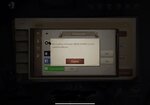
Any account that has been DMM’d will remain that way forever. The best you can get from a previously DMM’d account is a securely transferred, active DMM account, but that poses its own problems to be discussed below.
Deactivated DMMs are the most dangerous types of accounts to buy/trade for the reasons below. Avoid these if you can, especially if they are resells and the seller is not the original owner, since you have no idea if the original owner still has access to the account even if the reseller may be honest.
SECTION I. THE ONLY SECURE WAY
Keep in mind that the only surefire way to secure an account is to:
SECTION II. VARIOUS PROBLEMS YOU MAY ENCOUNTER
For all transactions, do not send any money until the middleman has fully secured the account in all the ways requested, including making sure the seller has logged off their DMM account access and logged off the game.
If you purchase/trade for an account that previously has DMM:
Transact safely, everyone. Good luck.
First, note that this game allows in-game accounts to have bindings through various social media, but the strongest bind is the DMM bind made through the DMM website here: https://www.dmm.com/
DMM binds are the strongest because DMM binds are permanent and cannot be removed, ever.

Any account that has been DMM’d will remain that way forever. The best you can get from a previously DMM’d account is a securely transferred, active DMM account, but that poses its own problems to be discussed below.
Deactivated DMMs are the most dangerous types of accounts to buy/trade for the reasons below. Avoid these if you can, especially if they are resells and the seller is not the original owner, since you have no idea if the original owner still has access to the account even if the reseller may be honest.
SECTION I. THE ONLY SECURE WAY
Keep in mind that the only surefire way to secure an account is to:
- buy/trade for an account without any DMM bind;
- use Trade Guardian and a middleman ON-SITE (EpicNPC middlemen will never work offsite and high-rep members are often impersonated on Discord, so just do everything here for your own safety);
- If you must communicate through Discord, be careful as well of this slightly more elaborate impersonator Discord scam summarized by user DejanXX: https://www.epicnpc.com/threads/my-impostor-going-around-adding-people-discord-blows.1799563/
- and have the middleman take the DMM account you just created (yes, you’ll need to make a new one because DMM binds are permanent) and bind it to the account you’re buying/trading for by logging into the game, going to the gear icon for “Settings” in the upper-right corner, navigating to the social links via “User Center”, and binding the DMM account;
-
- then, have the middleman also set a secondary password on the account immediately after securing it with the DMM;
- Go to the “Settings” button in the upper-right corner once you log into the game:
-
- Navigate to the “Safety” tab.
- Turn on and set the secondary password (you should not enable “Password Free Access” until some time after you’ve secured the account, just as a precaution):
-
- The secondary password is to block potential scammers who are still accessing the account from spending your echoes/opening your treasures/etc. out of spite, but you will need to monitor the account to make sure they don’t cause you to be reported and banned by harassing people in chat or PMs or using illegal, third-party software on the account in a match.
- Go to the “Settings” button in the upper-right corner once you log into the game:
- once you’ve secured the account in both these ways, if there is still unauthorized access attempts because the seller is still logged into the account on their original device, they will likely attempt to bind a variety of links to the account if they’re a scammer.
- Unfortunately, in this situation, there’s no way to forcibly kick them off the account permanently and you’ll likely end up in a back-and-forth log-in war (they will still get back in when you’re offline or resting, most likely) until the next maintenance.
- So I suggest transacting very soon before a maintenance, perhaps within the same day of an upcoming maintenance, if you’re worried the seller is suspicious.
- You will have to wait until the next maintenance that forcibly kicks everyone out of the game, then remove all their binds and leave only the DMM. This is why it’s important to be in full control of the DMM as you can always use the DMM to log in once it’s bound and active and the bind is permanent, so even if the scammer tries to access the account they can never remove you permanently, but you can remove them entirely given enough time.
- Unfortunately, in this situation, there’s no way to forcibly kick them off the account permanently and you’ll likely end up in a back-and-forth log-in war (they will still get back in when you’re offline or resting, most likely) until the next maintenance.


SECTION II. VARIOUS PROBLEMS YOU MAY ENCOUNTER
For all transactions, do not send any money until the middleman has fully secured the account in all the ways requested, including making sure the seller has logged off their DMM account access and logged off the game.
If you purchase/trade for an account that previously has DMM:
- If the DMM is still active:
- You run the risk of the person remaining logged into the DMM account on the DMM website and undoing your new binds/changes. There is no way to kick them off on the website.
- Refer to this PSA by LukasJiulu: https://www.epicnpc.com/threads/a-w...ing-and-my-impersonator.1690252/#post-7001701
- The user may still remain logged in on a device that has previously accessed the account even if details were changed.
- In this dispute thread, after a scammer regained control of the account, the middleman was still able to access the account on his device to attempt to resecure it. While this was marginally helpful to me at the time, the scammer was actively undoing all the binds the middleman was trying to add to resecure the account. This indicates, however, that prior access is not necessarily removed from devices that have already logged into the account, which means your account may still not be secure regardless of your attempts.
- The best-case scenario here is that the user transfers the DMM access to you (through the middleman, ideally) and logs out on their end. You should require them to post a quick video clip on Streamable or something that clearly shows the same DMM account—which you can check through the DMM account ID highlighted in the screenshot below—that they’re logging out of (don’t let them screw you over by quickly logging out of some other random DMM account). Make sure they open a new browser tab in the video and type in “current local time” and complete the search (or the current time of whatever timezone you’re in if that makes it easier) to prove the timestamp of when they logged out, since the PC’s clock can be adjusted.
-
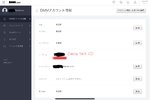
- When logged in to the DMM account on the DMM website, use this link to navigate to the social links page that are linked to the DMM site’s account: https://www.dmm.com/my/-/social-login/link-list/
- Make sure the user has no other links that would still be able to access the DMM account. If there are any, make sure you or the middleman remove all of them.
- When logged in to the DMM account on the DMM website, use this link to check for other logins using the DMM account: https://www.dmm.com/my/-/security/
- It’s possible the seller will log out of the DMM account on the website through one browser/device to make your proof video, but still be logged in on another browser/device, so just check all the logins and make them send you a log-out video of all the devices you see logged in if you’re worried.
- Ideally, a seller will also show themselves logging out of the game as well, but I’ve had issues uploading recordings from a mobile device (unless they’re playing on PC) and there’s a few minor hoops to jump through to move the files over to a PC, so if this step is too cumbersome just prioritize the DMM access.
- Make sure the middleman confirms that the same DMM login can also login to the correct account in the game to double check if this is the correct DMM account.
-
- Securing a DMM’d account with an active DMM is a lot of work, but it is still potentially possible if the seller is not going through the extra mile to scam you. It is impossible to secure for a deactivated DMM account.
- You run the risk of the person remaining logged into the DMM account on the DMM website and undoing your new binds/changes. There is no way to kick them off on the website.

- If the DMM is deactivated:
- The user may still remain logged in on a device that has previously accessed the account even if details were changed. Refer to the second major point above, Section II, point 1(2). That problem is still applicable here and in this scenario, you do not have DMM access and cannot remove them permanently.
- The account is permanently compromised in this case and no attempts used in Section I will be able to secure it. At best, you can spite them for a time by setting a secondary password per Section I, point 4, since they’ll need to enter that secondary password to disable it and they won’t be able to if you set it. They’ll likely be able to get this secondary password removed through the game’s support after some time.
- There is an e-mail that DMM, the site, will send to people who have deactivated their DMM. It’s entirely in Japanese and will show the random DMM website ID (has nothing to do with the username in-game) and the time of the deactivation. If they cannot provide it, assume they’re lying about DMM deactivation.
- Even if they can provide this e-mail, keep in mind this does not mean that the deactivated DMM account is the same one linked to the IDV account you’re trying to buy/trade for. You will not be able to check in this scenario because the DMM account is deactivated.
- If they can provide it, make sure you run the Japanese text through a quick Google translate to make sure the gist is clear that the account is ‘withdrawn’. The e-mail should look something like the sample below.
-
- Regardless, these methods can do nothing to truly secure an account that has a deactivated DMM since a scammer can just remain on their device and keep logging to unbind your new binds. Don’t buy/trade accounts with deactivated DMMs if you can help it because there’s no way—not even a long, arduous way—to permanently secure it.
- The user may still remain logged in on a device that has previously accessed the account even if details were changed. Refer to the second major point above, Section II, point 1(2). That problem is still applicable here and in this scenario, you do not have DMM access and cannot remove them permanently.

Transact safely, everyone. Good luck.


