


EpicNPC
 Administrator
- Rating
- 5.00 star(s)
- Country
- United States
A new "Original Email" filter has been added to the Steam Account forum. This filter can help buyers find accounts where the seller has full access to the original email that was used to create the Steam account.
In order to claim your account comes with the Original Email, you must show proof of one of the following.
Methods to find out the creation date:
- If an account is over a year old, you can look at the "years of service" badge to get the exact creation date.
- If not, look at the other badges. The 1+ game and pillar of community badges are usually earned on the day of creation or shortly after.
- The "Licenses and product key activation" shows all games activated on the account, including the free ones. The first game usually matches the creation date.
A "First Letter" from Steam will look like this:

The importance of knowing whether your account comes with the Original Email has to do with when you need to get support from Steam for your account. If there are no purchases on your account, Steam will relegate and assume that the person emailing them using the Original Email, is indeed the original owner.
Payment data is most important evidence someone can have when contacting Steam support, followed by using the original email account.
If you are purchasing an account with Steam market history, make sure the seller is reputable as the Steam Market purchase history evidence will trump the original email.
Whether you're selling an account with or without the Original Email, it is important to use Trade Guardian so that your appointed Middleman can check these type's of important information pieces before handing the account that you intend to purchase to you.
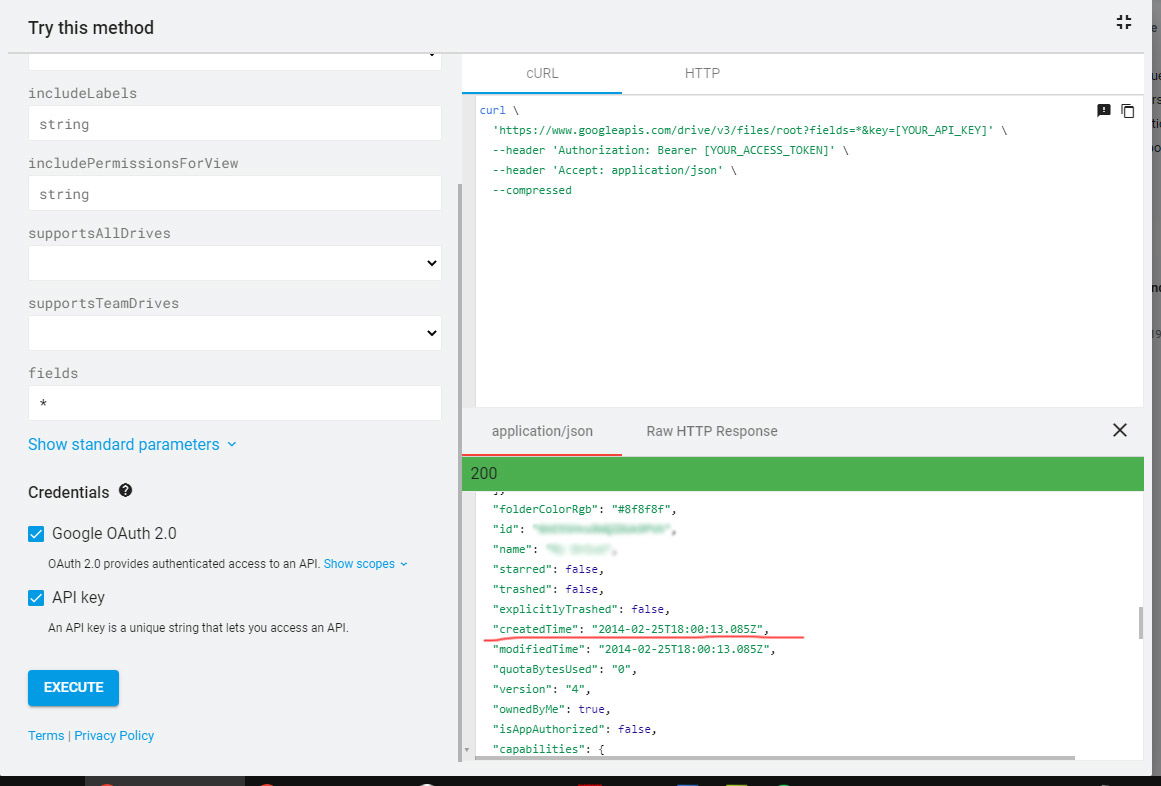
check https://developers.google.com/apis-explorer/#p/drive/v3/drive.files.get?fileId=root&fields=*&_h=4&
2. Click 'execute' while logged into the Gmail account you want to check.
3. Grant permission to Google API Explorer to access your Google account.
4. Scroll near the bottom to find the creation date.
Happy bidding,
The EpicNPC Team.
In order to claim your account comes with the Original Email, you must show proof of one of the following.
- Show the "First Letter" that Steam sent when you first registered your account and compare the date with the account creation date.
- Or have emails from Steam with dates that line up with the first games played on Dota 2, CS:GO or any other steam game that has recorded games played with dates.
Methods to find out the creation date:
- If an account is over a year old, you can look at the "years of service" badge to get the exact creation date.
- If not, look at the other badges. The 1+ game and pillar of community badges are usually earned on the day of creation or shortly after.
- The "Licenses and product key activation" shows all games activated on the account, including the free ones. The first game usually matches the creation date.
A "First Letter" from Steam will look like this:
The importance of knowing whether your account comes with the Original Email has to do with when you need to get support from Steam for your account. If there are no purchases on your account, Steam will relegate and assume that the person emailing them using the Original Email, is indeed the original owner.
Payment data is most important evidence someone can have when contacting Steam support, followed by using the original email account.
If you are purchasing an account with Steam market history, make sure the seller is reputable as the Steam Market purchase history evidence will trump the original email.
Whether you're selling an account with or without the Original Email, it is important to use Trade Guardian so that your appointed Middleman can check these type's of important information pieces before handing the account that you intend to purchase to you.
Gmail Creation Date
1. Go to this Google API Explorercheck https://developers.google.com/apis-explorer/#p/drive/v3/drive.files.get?fileId=root&fields=*&_h=4&
2. Click 'execute' while logged into the Gmail account you want to check.
3. Grant permission to Google API Explorer to access your Google account.
4. Scroll near the bottom to find the creation date.
Happy bidding,
The EpicNPC Team.
Last edited: