

What is Dragon Ball Z Dokkan Battle?
Dragon Ball Z Dokkan Battle is a mobile game developed by Akatsuki and published by Bandai Namco Entertainment. As the name suggests the game is based on the popular anime series Dragon Ball Z.
The game mixes board games, collectible card games, and puzzle game mechanics. DBZ Dokkan Battle has a very unique gameplay which is why it is so popular. It was released in 2015 and currently has over 350 million players.
Many people like to sell or buy a high-value DBZ Dokkan Battle account. If you are looking forward to selling or buying a Dokkan Battle account then look no further, because in this guide we will tell you how to buy/sell Dragon Ball Z Dokkan Battle Account. You can also use these steps to transfer accounts from one device to another.
Selling Dokkan Battle Account
This section is for all the people who want to sell their DBZ Dokkan Battle account for the first time. You can simply follow these steps to find out what you need to do to sell your account.You can buy and sell DBZ Dokkan Battle accounts by checking out EPICNPC’s Dokkan Battle forums.
https://www.epicnpc.com/forums/dragon-ball-z-dokkan-battle-accounts.814/
First of all, you need to unlink your other accounts (except Gmail) before selling it. So to do that follow along:
- Open your game and you will see the main screen. On the main screen click on the icon which reads “Menu.”
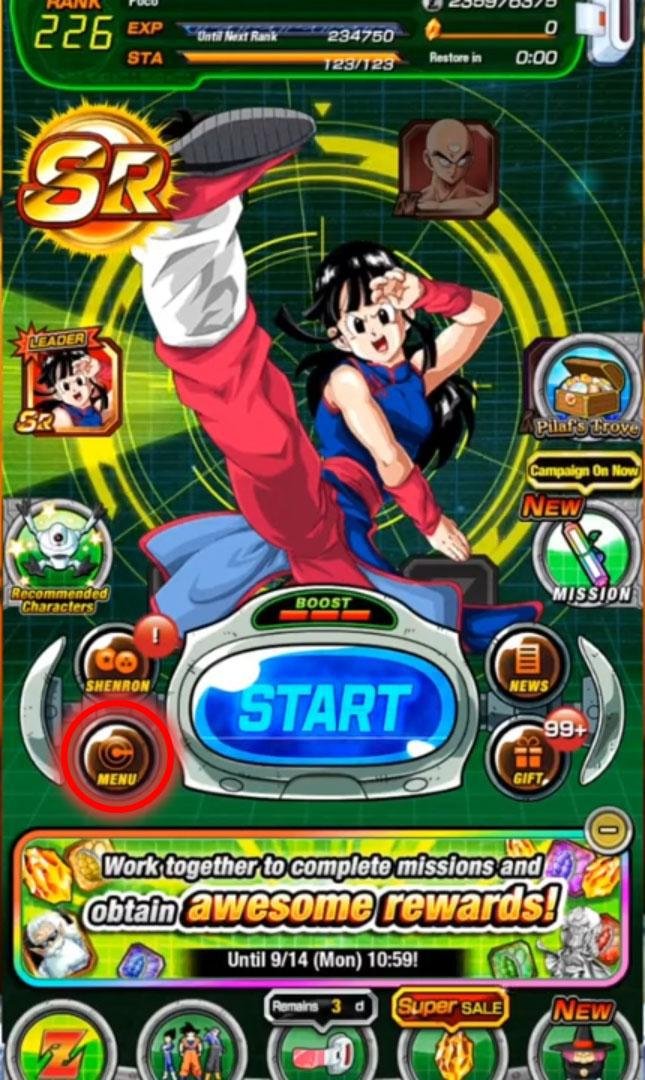
- Now you will see the Menu window open up. In this window click on the option that reads “Data Linking & Back Up.”
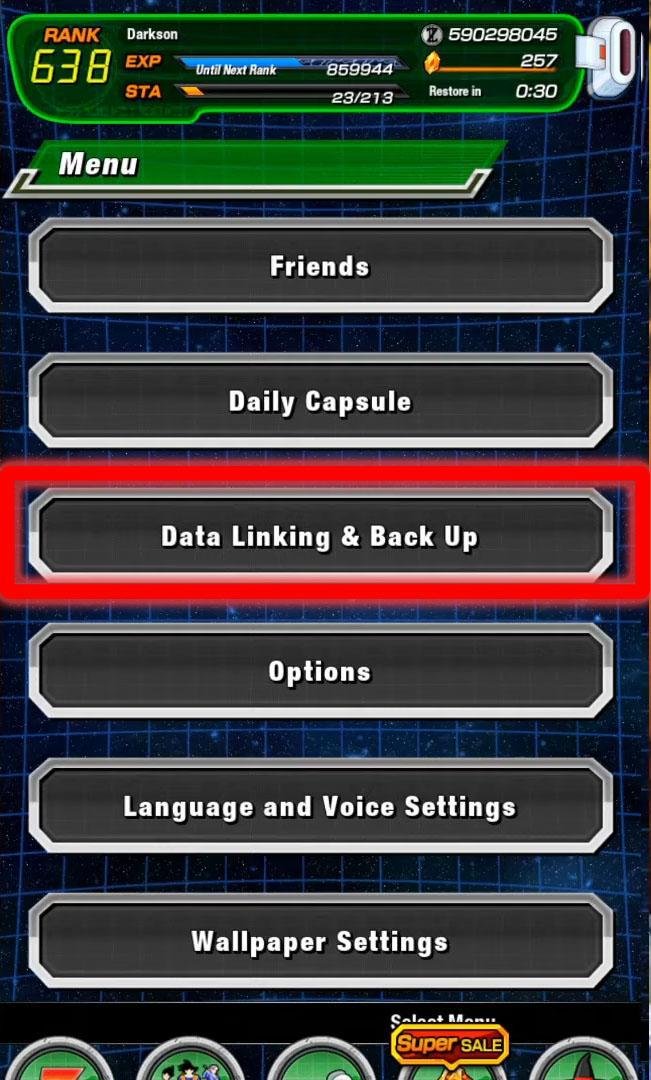
- Make sure to link your Google or an Apple account (or any account you want to sell) and unlink all the other accounts. Once the account is linked the text will become green.
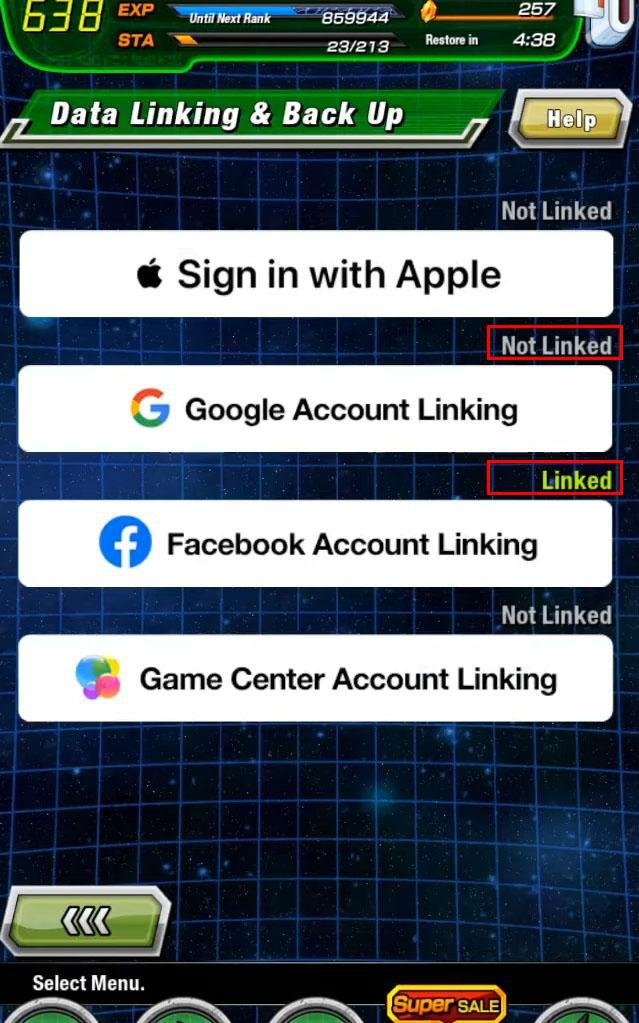
- Once you’ve unlinked all the unnecessary accounts, you can successfully sign out the account.
Buying DBZ Dokkan Battle Account
Like most mobile games, Dragon Ball Z Dokkan Battle uses either a Gmail account or an Apple account. Most people who are looking to sell their accounts give out these accounts. Apart from Gmail and Apple accounts, you can also use a Facebook account but that is not recommended.
We talk about the Android version of the game because Android is more commonly used around the world but the exact steps can be used for your iOS account as well.
When you successfully buy an account you’ll receive a Gmail account because that’s where the data is stored. You must log in to that Gmail account on your device and then proceed to the following steps:
- First, you need to open up your game and tap on the screen. Upon tapping, a window will open up asking you to either start a “New Game” or “Continue Game”. Click on the “Continue Game” button to proceed.
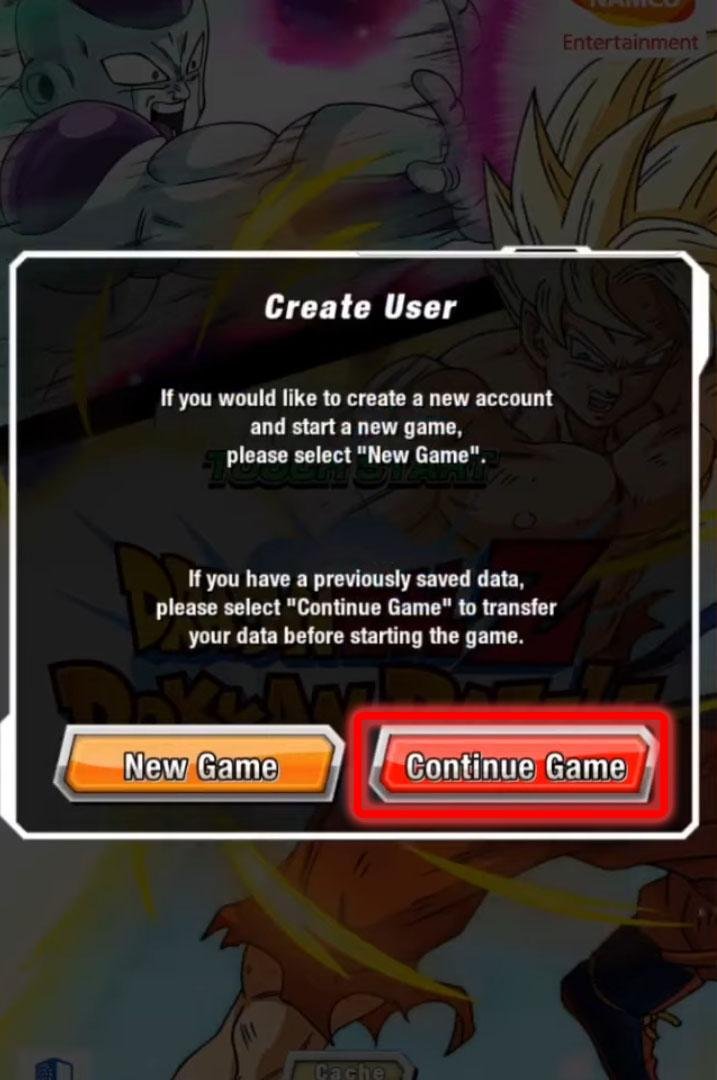
- You will get a window asking you to choose which account you want to sign in to. In our case, it is a Google account so we’ll click on “Transfer Game Data via Google.”

- Now type in your email and password in the opened window.
- The window will show you the information, you can verify it with the seller to make sure it is the same as he said and then click ok.

- A confirmation window will pop up, you can click on proceed and your data will be transferred.
Note: If you transfer an account from one OS to another (like from Android to iOS) you will lose all your Dragon Stones so keep that in mind before proceeding.
Steps for securing your DBZDB Account
After obtaining an account, it is crucial to protect it. It will protect all of your data and ensure that your money is not wasted. It is strongly advised that you follow these steps after obtaining a DBZ Dokkan Battle account.The best way to safeguard any account you've acquired is to use 2FA (2-Factor Authentication) or Two-Step Verification. Two-factor authentication is supported by all services, and the methods are almost identical.
So to keep things simple, we'll go through how to protect a Gmail account, which is the most popular:
⦁ Open your Google Account.
⦁ In the navigation panel, select Security.
⦁ Under Signing in to Google, select 2-Step Verification.
⦁ Add in your preferred verification method.
Changing the password is the second strategy to safeguard an account. If you don't want to deal with any complications, simply follow these instructions to change your new account's password:
⦁ On your Android phone or tablet, open your device's Settings app > Google > Manage your Google Account.
⦁ At the top, tap Security.
⦁ Under Signing in to Google, tap Password. You might need to sign in.
⦁ Enter your new password, then tap Change Password.
Tips for Buyers
⦁ Verify that the account you’re buying matches the one that is being advertised.⦁ After purchasing a DBZ Dokkan Battle account, be sure you use the procedures listed above to thoroughly protect it.
⦁ Make sure the account is not linked to another account such as Facebook or Twitter. If it is, simply delink it and then secure it.
Tips for Sellers
⦁ Make sure you have access to the associated email account so you can receive a code when customers demand one.⦁ Don’t provide the login and codes before a mutual trust has been established
⦁ If the buyer refuses to go first and you don't trust them, try using Trade Guardian and hiring an official EpicNPC Middleman to assist you in completing a secure transaction.
⦁ Remove any payment links associated with your account such as Google Pay, etc.
So that was our guide for people who want to buy DBZ Dokkan Battle account or sell DBZ Dokkan Battle account. These steps will help you make sure that your exchange goes smoothly and your money is not wasted.
Last edited by a moderator:
