

In this guide I will provide you with the information that you need when buying or selling League of Legends account.
Along with other games made by Riot, League of Legends uses a Riot Games account.
The minimum information that you need to receive from the seller when buying a League of Legends account is the username and password of the account. Receiving the linked email is recommended but optional.
Riot's username is only used when logging in to the game. It is different from the actual in-game username, which is called a Riot ID.
To list your LoL account for sale or to find one to buy, you can check out Epicnpc's League of Legends section.
https://www.epicnpc.com/forums/league-of-legends-lol-na-accounts.74/
Once you receive the username and password from the seller, the first thing that you should do is log in to the game client and check whether the account matches the description of the League of Legends account that you are buying.
After you confirm that everything is there, secure the account using the following steps:
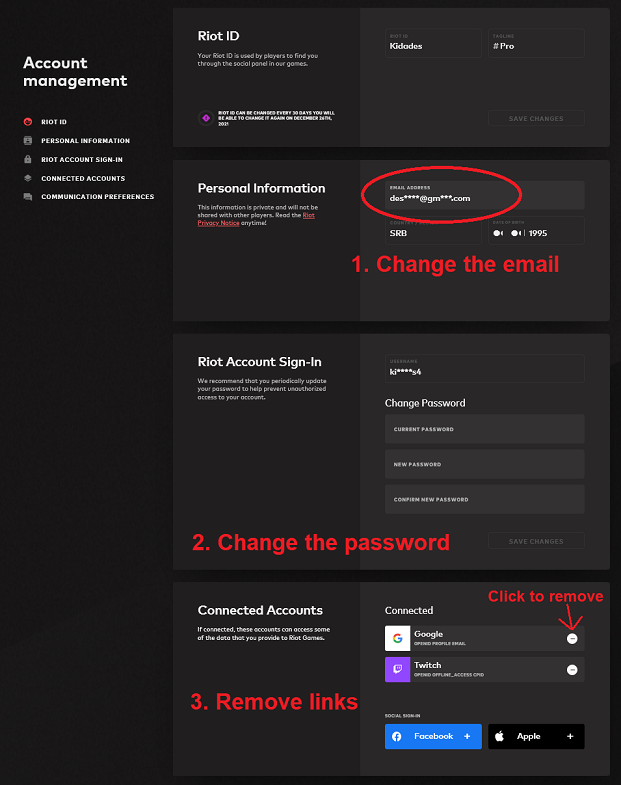
1. Access the account management website by going to this URL: https://account.riotgames.com
2. Enter the username and password that you received from your seller.
The system will ask you to confirm your identity by receiving a code from the associated email address. If the seller has provided you with the email account, you can get this code yourself. Otherwise, ask the seller to provide you the 6 digit code from their email.
After successful verification, you will now be taken to the main account management page.
Here, you need to change the email and password, and unlink the account from social networks.
3. To change the email, just write a new address over the existing one in the "Email address field" and click submit. A verification message will be sent to the new email address. Click on the red "Confirm Email" button to complete the change.
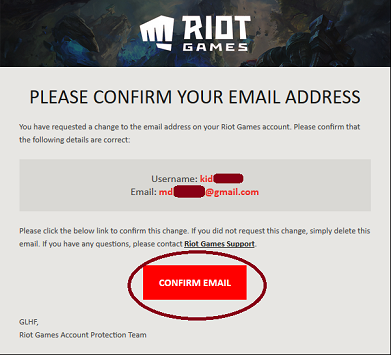
League of Legends has no restriction on email changes and you can do it as often as you like.
4. Next, change the password by typing in the old password, followed by the new one which needs to be confirmed another time. Click on the submit button to complete the change. No email verification is needed.
5. Finally, scroll all the way down to the "Connected Accounts" section. If there are connected accounts, they will show up under "Connected" group. Click on the minus sign next to each and then confirm by clicking on the newly appeared check mark icon.
Once all the connected accounts are removed, the account is secured. If you received the information first, it is now time to make the payment to the seller.
Apart from the username, password and email, you can ask the seller for some additional information. This is what Riot Games support uses when confirming the account owner and recovering the account:
Although it's not possible to verify whether the provided information is correct, it's still a good idea to ask for this when buying a League of Legends account.
- Check whether the account has a matchmaking ban by searching for a ranked match. If a match is found, it means that the account does not have a ban. Just decline the found match and move on to securing the account.
- Make sure that you're buying an account of the correct region. Accounts are region locked and buying an account from the wrong region is a mistake that some buyers make when buying a League of Legends account. Transfers to other regions are possible, but they are not free.
- Make sure that you have access to the associated email account so that you can receive a code when buyers request it. If possible, provide this email account to the buyer.
- Do not provide the code too early. The buyer can log in to the game and check the account without needing a code. A code is only needed when accessing the account management website and allows all changes to be made to the account. If the buyer is going first, make sure to receive the payment before providing the code. In case you're giving the email account as well, the same applies. Do not provide access to it before the payment.
- Delete your friends list before selling your League of Legends account. If you have a Paypal account saved for easy purchases, make sure to remove this link.
- Prepare the additional information listed above in advance so that you're ready to provide it to your buyer when needed.
- If the buyer refuses to go first and you do not trust them, consider using Trade Guardian and getting an official EpicNPC Middleman to help you conduct a safe trade.
Buying a League of Legends account
Along with other games made by Riot, League of Legends uses a Riot Games account.
The minimum information that you need to receive from the seller when buying a League of Legends account is the username and password of the account. Receiving the linked email is recommended but optional.
Riot's username is only used when logging in to the game. It is different from the actual in-game username, which is called a Riot ID.
To list your LoL account for sale or to find one to buy, you can check out Epicnpc's League of Legends section.
https://www.epicnpc.com/forums/league-of-legends-lol-na-accounts.74/
Securing a League of Legends account
Once you receive the username and password from the seller, the first thing that you should do is log in to the game client and check whether the account matches the description of the League of Legends account that you are buying.
After you confirm that everything is there, secure the account using the following steps:
1. Access the account management website by going to this URL: https://account.riotgames.com
2. Enter the username and password that you received from your seller.
The system will ask you to confirm your identity by receiving a code from the associated email address. If the seller has provided you with the email account, you can get this code yourself. Otherwise, ask the seller to provide you the 6 digit code from their email.
After successful verification, you will now be taken to the main account management page.
Here, you need to change the email and password, and unlink the account from social networks.
3. To change the email, just write a new address over the existing one in the "Email address field" and click submit. A verification message will be sent to the new email address. Click on the red "Confirm Email" button to complete the change.
League of Legends has no restriction on email changes and you can do it as often as you like.
4. Next, change the password by typing in the old password, followed by the new one which needs to be confirmed another time. Click on the submit button to complete the change. No email verification is needed.
5. Finally, scroll all the way down to the "Connected Accounts" section. If there are connected accounts, they will show up under "Connected" group. Click on the minus sign next to each and then confirm by clicking on the newly appeared check mark icon.
Once all the connected accounts are removed, the account is secured. If you received the information first, it is now time to make the payment to the seller.
Additional information
Apart from the username, password and email, you can ask the seller for some additional information. This is what Riot Games support uses when confirming the account owner and recovering the account:
Account signup email
Account creation date
Date of Birth on the account (if you added it)
Location where account was registered (city and country)
Other people (friends/family members) who have ever had access to the account?
What was your first ever RP purchase? (Include date and item)
What did you use your refund tokens on?
Do you remember the first 5 champions you have purchased?
Did you receive or give gifts on this account? Which ones?
Although it's not possible to verify whether the provided information is correct, it's still a good idea to ask for this when buying a League of Legends account.
Tips for buyers
- Check whether the account matches with what is advertised before securing it. Do not leave this step for the end.- Check whether the account has a matchmaking ban by searching for a ranked match. If a match is found, it means that the account does not have a ban. Just decline the found match and move on to securing the account.
- Make sure that you're buying an account of the correct region. Accounts are region locked and buying an account from the wrong region is a mistake that some buyers make when buying a League of Legends account. Transfers to other regions are possible, but they are not free.
Tips for selling a League of Legends account
- Make sure that you have access to the associated email account so that you can receive a code when buyers request it. If possible, provide this email account to the buyer.
- Do not provide the code too early. The buyer can log in to the game and check the account without needing a code. A code is only needed when accessing the account management website and allows all changes to be made to the account. If the buyer is going first, make sure to receive the payment before providing the code. In case you're giving the email account as well, the same applies. Do not provide access to it before the payment.
- Delete your friends list before selling your League of Legends account. If you have a Paypal account saved for easy purchases, make sure to remove this link.
- Prepare the additional information listed above in advance so that you're ready to provide it to your buyer when needed.
- If the buyer refuses to go first and you do not trust them, consider using Trade Guardian and getting an official EpicNPC Middleman to help you conduct a safe trade.
Last edited by a moderator:


