

What is Dislyte?
Dislyte is a gacha game from developer Lilith Games and is a mix of fantasy, mythology, and cyberpunk aesthetics where you control a squad of Espers as you battle waves of enemies and, eventually, a boss. You are able to collect more than 60 characters which you can rank up, and build your team with them.
A game has been released in the first quarter of May on Android and IOS and instantly become very popular among gamers and also on this forum where you can buy or sell your own account.
https://www.epicnpc.com/forums/dislyte-accounts.2510/
First, make sure to confirm how your account is linked. Most Dislyte accounts are linked with Lilith's email and this link is permanent so you will have to transfer also an email together with the account.
If your account is still unlinked you will have to link it first so you can transfer the account to the new owner. There are 3 options to link Dislyte accounts, Lilith, Google, and Facebook, where Lilith is easier to transfer so we advise you to use Lilith's email to bind your account for the first time.
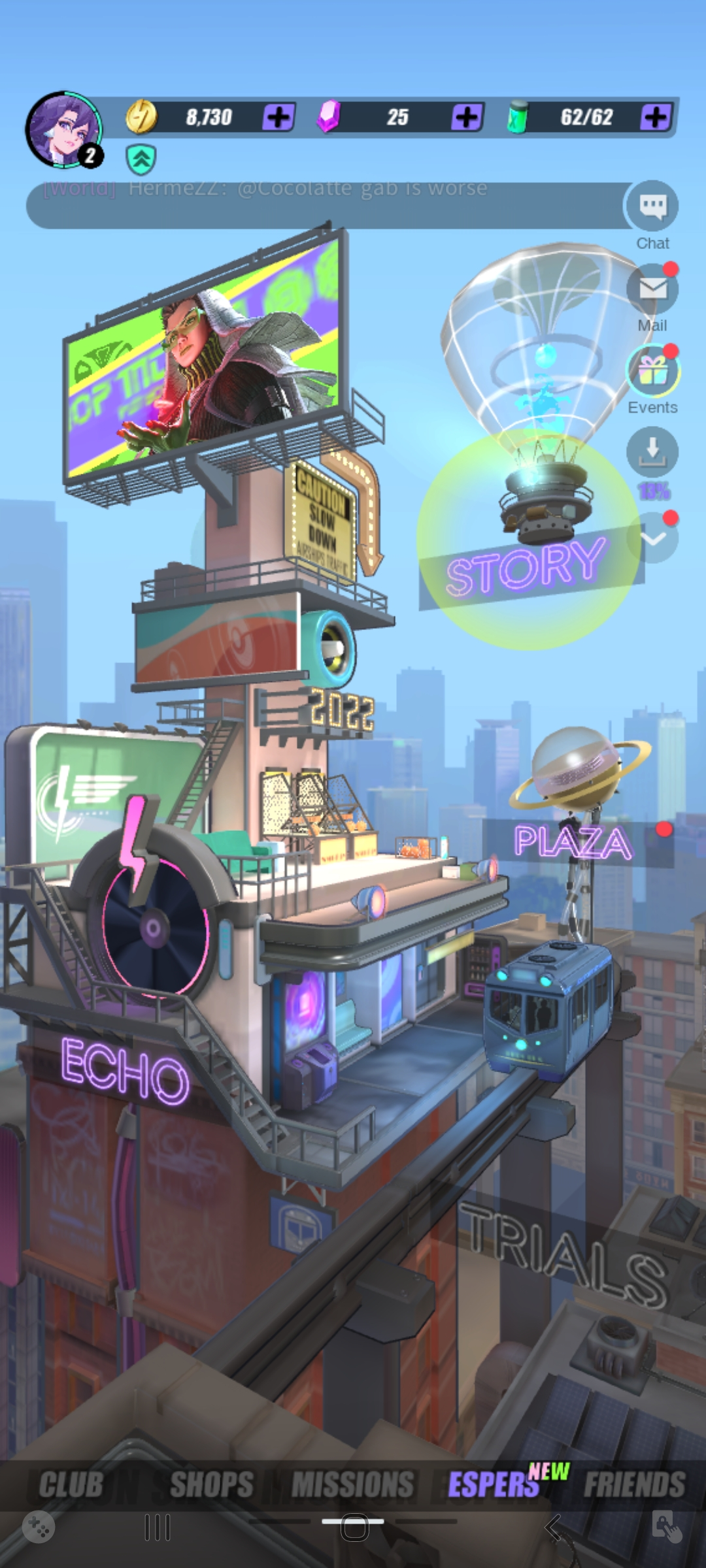
1. To bind your account you will have to open your game’s home screen, which should look like this:
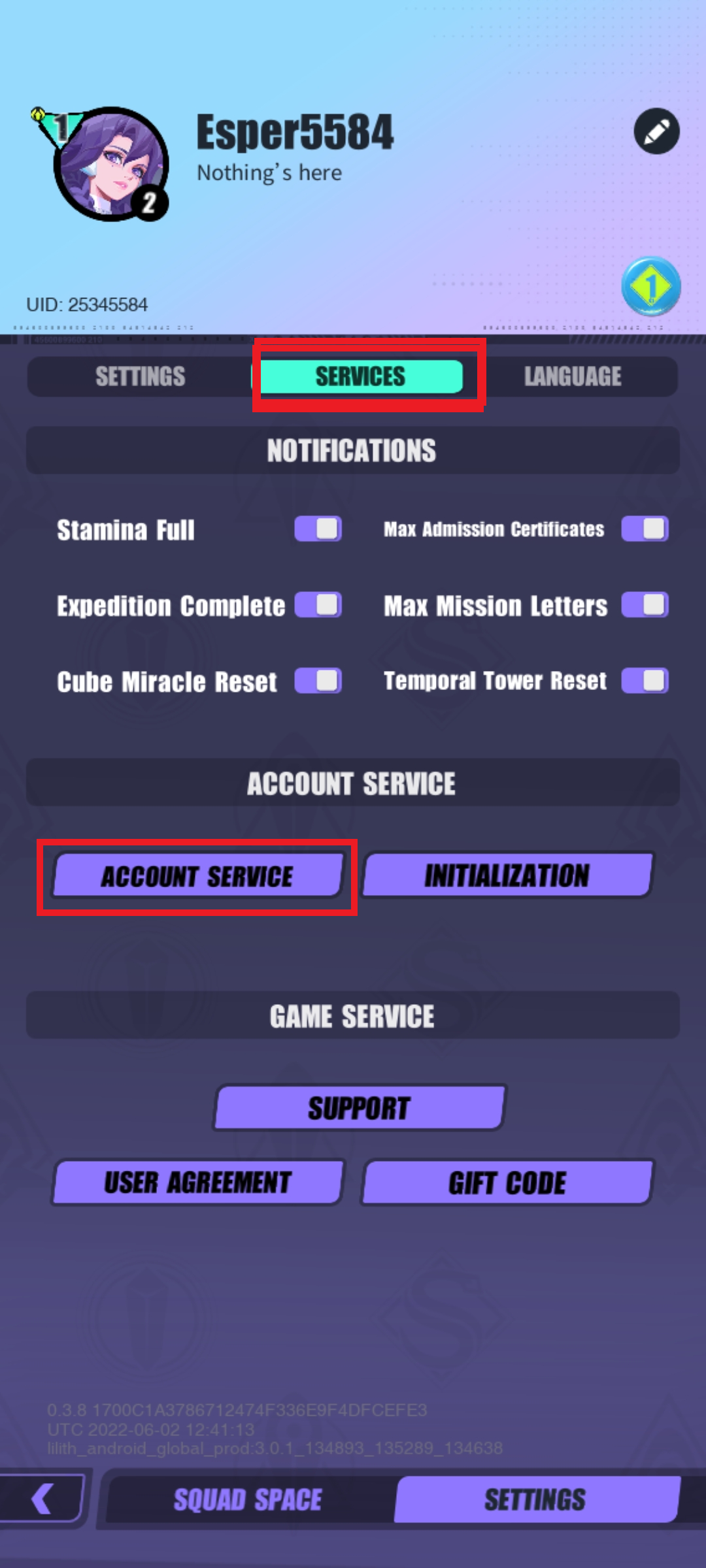
2. Now click on the top left corner of the screen, and next page click settings and service like on the next image. From service menu click account service which will lead you to the option where you will be able to bind your account
3. On the next image you will be able to see how should looks a completely unlinked account
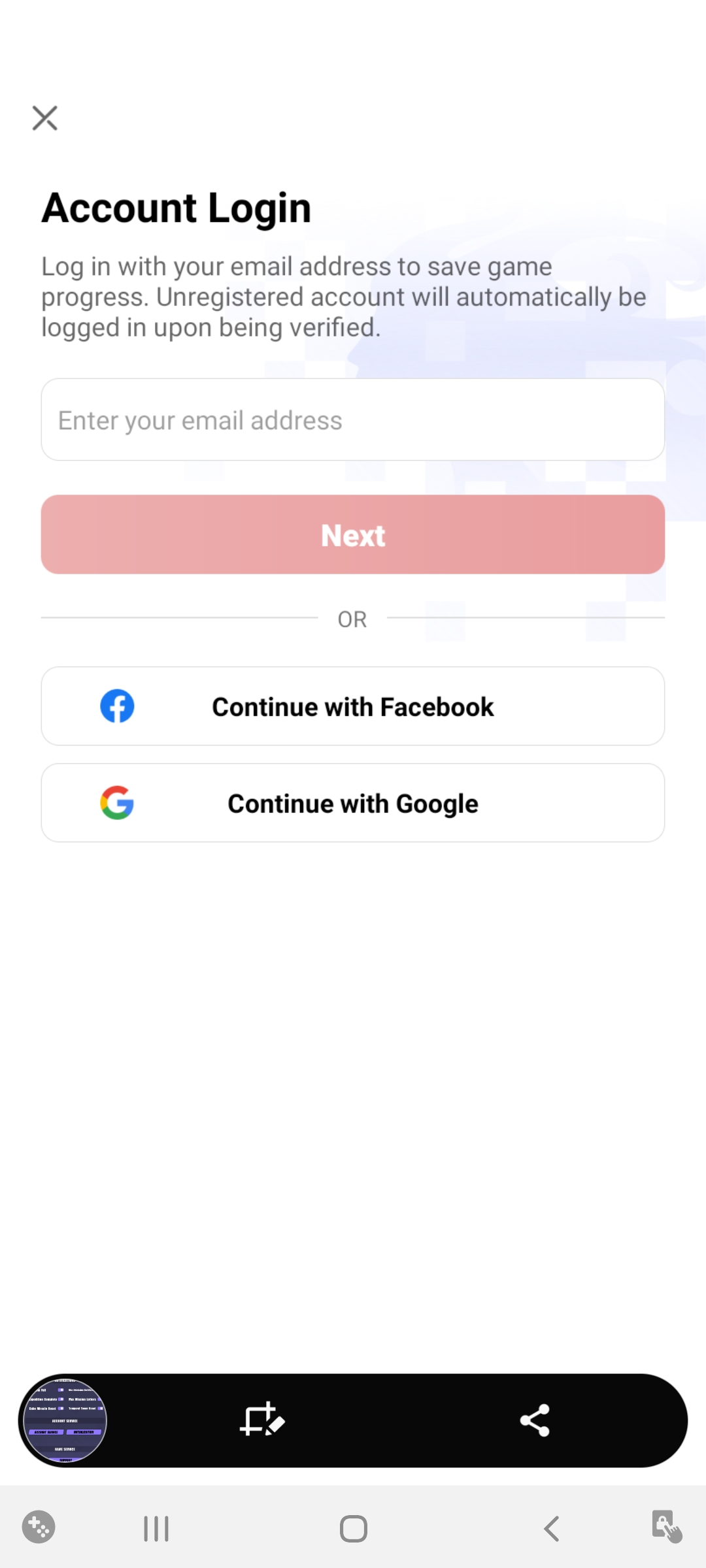
4. To link an account with Lilith you will have to choose the first field, and make sure to choose a dummy email because you will have to provide it all together.
- New page will ask you to enter your verification code, please check your email to obtain this code.
5. Finally when an account is linked, it will be ready for sale. In case you have it already linked with another method, make sure that is ready for transfer before the sale is made.
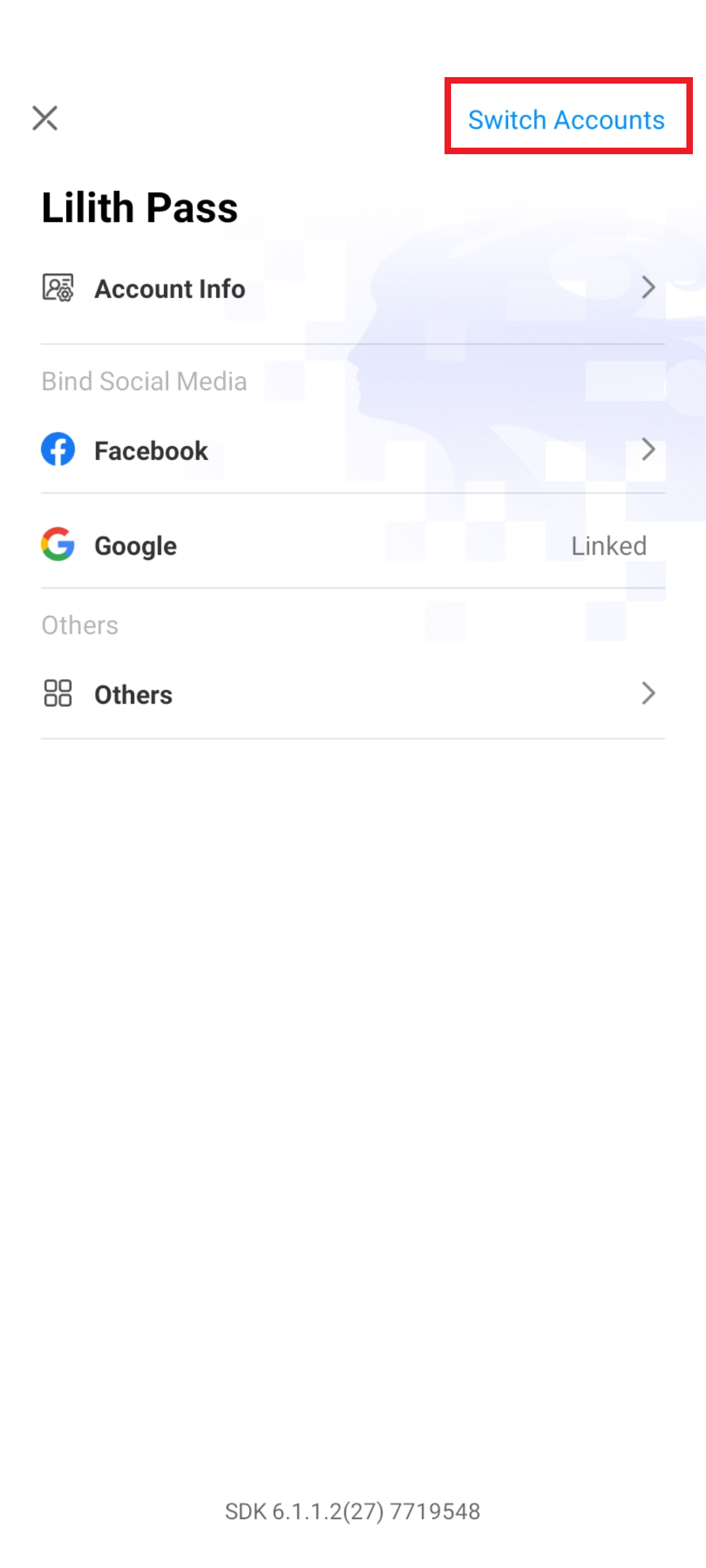
- Next option you will be able to see bind methods and to be able to transfer a new account you have to choose a "switch account" on the top right corner of the screen.
2. On the new option you have to choose a method you got from the seller, and enter an email and password after your game will be loaded again.
- After the account properly loads, first what you have is to confirm if the account is the same as described by the seller. Next return to the bind menu and check if there is anything else linked except the method you already got. On the image above you can see an example where account is linked with Google, where it shows "linked" on the right side. If there is nothing near Google and Facebook that means that Lilith is the only bind method used for this game. [In the case where you have linked Facebook, Google, or both you have to request from the seller to provide you these too so you can secure it.]
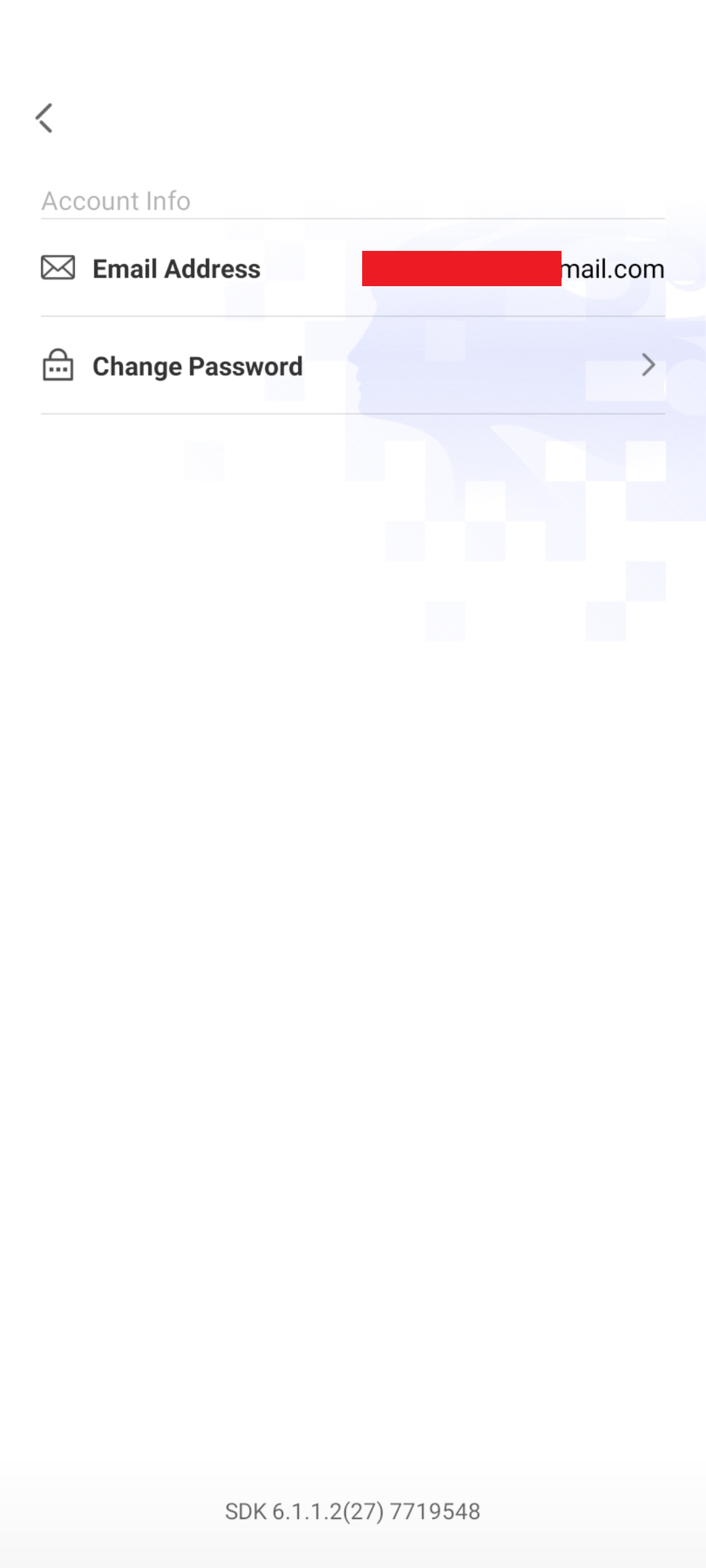
3. Change Lilith's password, click again on Account Info - Change Password, and set up a new Lilith password
4. After you finish the previous steps, the last one will be to remove an account from the previous device. You can do this from Lilith menu, click others and from the next page you will have to reset login like on the next image.

This guide is made in hope to will help you conduct safe sales and purchases and according to this, we wish you a happy trade.
Dislyte is a gacha game from developer Lilith Games and is a mix of fantasy, mythology, and cyberpunk aesthetics where you control a squad of Espers as you battle waves of enemies and, eventually, a boss. You are able to collect more than 60 characters which you can rank up, and build your team with them.
A game has been released in the first quarter of May on Android and IOS and instantly become very popular among gamers and also on this forum where you can buy or sell your own account.
Selling Dislyte Account
If you're interested in selling your Dislyte account you have to open the thread on the next forum:https://www.epicnpc.com/forums/dislyte-accounts.2510/
First, make sure to confirm how your account is linked. Most Dislyte accounts are linked with Lilith's email and this link is permanent so you will have to transfer also an email together with the account.
If your account is still unlinked you will have to link it first so you can transfer the account to the new owner. There are 3 options to link Dislyte accounts, Lilith, Google, and Facebook, where Lilith is easier to transfer so we advise you to use Lilith's email to bind your account for the first time.
1. To bind your account you will have to open your game’s home screen, which should look like this:
2. Now click on the top left corner of the screen, and next page click settings and service like on the next image. From service menu click account service which will lead you to the option where you will be able to bind your account
3. On the next image you will be able to see how should looks a completely unlinked account
4. To link an account with Lilith you will have to choose the first field, and make sure to choose a dummy email because you will have to provide it all together.
- New page will ask you to enter your verification code, please check your email to obtain this code.
5. Finally when an account is linked, it will be ready for sale. In case you have it already linked with another method, make sure that is ready for transfer before the sale is made.
Securing your Dislyte Account
1. After you bought a Dislyte account you will have to transfer the account to your device and to do this you will have to follow the 1st and 2nd steps from the guide above.- Next option you will be able to see bind methods and to be able to transfer a new account you have to choose a "switch account" on the top right corner of the screen.
2. On the new option you have to choose a method you got from the seller, and enter an email and password after your game will be loaded again.
- After the account properly loads, first what you have is to confirm if the account is the same as described by the seller. Next return to the bind menu and check if there is anything else linked except the method you already got. On the image above you can see an example where account is linked with Google, where it shows "linked" on the right side. If there is nothing near Google and Facebook that means that Lilith is the only bind method used for this game. [In the case where you have linked Facebook, Google, or both you have to request from the seller to provide you these too so you can secure it.]
3. Change Lilith's password, click again on Account Info - Change Password, and set up a new Lilith password
4. After you finish the previous steps, the last one will be to remove an account from the previous device. You can do this from Lilith menu, click others and from the next page you will have to reset login like on the next image.
This guide is made in hope to will help you conduct safe sales and purchases and according to this, we wish you a happy trade.