EpicNPC

Register a free account today to become a member!

  • All threads in this section are old and inactive.
    Items and services are no longer available.

EVE Echoes Multi-Instance Bot

Not Recently Bumped
Country
Italy
Multiple Accounts
0
Member Since February 15, 2021
Trade Guardian Orders: 1
Total Feedback: 1
WARNING! Off-site contact information posted. Most scams occur off-site. Please contact members directly via EpicNPC chat. We do not investigate disputes if you communicate off-site.
Hello EpicNPC, I'm here to present my Eve Echoes farming bot; me and some friends used it since the launch of this game with no issues.
This is a external OCR/image recognition bot working, we don't have limits on max instances, so you can run as many accounts as long you PC can run the emulators smoothly.
You can get a copy at our forum (Cavecanem) or here by pm'ing me or by using tradeguardian. The bot will be slotted to 100 peoples maximum. Pricing is 6 euro/month.

Features

This automation software is targeted to Barges, it will not work with Ventures.*1
  • Safe: no root or modifications required, interact externally with the game.
  • Lightweight, can run on a potato*2
  • Unlimited sessions (multi emulator/instance support)
  • Automatic recognition of Stabs/Miner in hotbar
  • Configurable dump station (currently limited to system)
  • Random belt/cluster selection
  • Smart asterioid approach
  • Empty belt detection
  • Red/Gank detection (with configurable killswitch)*3
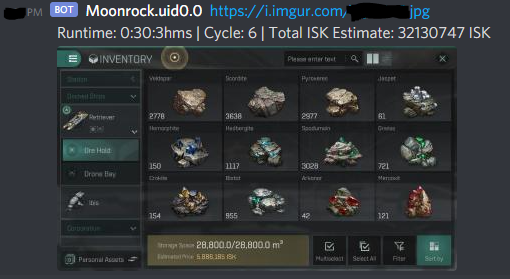
  • Notification support on both Telegram and Discord
  • Configurable timings
  • LUA interpreter with custom function to easily create scripts
  • LUA triggers for ingame events (run scripts on certain game events, like entering a belt, approaching a mineral etc)
  • TCP Server in the Instance Manager for connecting multiple bots to one single control unit
  • Bots can share the local status using the Instance Manager server
  • Watchdog mode for scanning reds at gates or in station as a dedicated account
  • Automatic restart for crashed games, Instance Manager can also restart the bot

  1. 1)Venture mode is back since it was requested by some users. however I still don't find it much remunerative.
  2. 2)The bot is very lightwheight, however android emulators are not. Make sure you can run the game without strutters and lag.
  3. 3)If the killswich mode is on, after returning to base the bot will close. We advice to keep this on.

Requirements
  • Microsoft .net framerwork 4.7.2 (you should already have this)
  • MeMU > 7.2.2 or others*
  • VC++ Redist 2019/7 (you should already have this)
* The application is developed and tested on MeMu, however it can techically work with any emulator (Nox, Bluestacks, etc) and even phones as long ADB (android debug bridge) is enabled. More emulators will be officially supported in future updates.
Make sure your computer is powerful enough to run the game, emulators can be very resource intensive. Also make sure you have VT-D on in your BIOS.

Screenshots
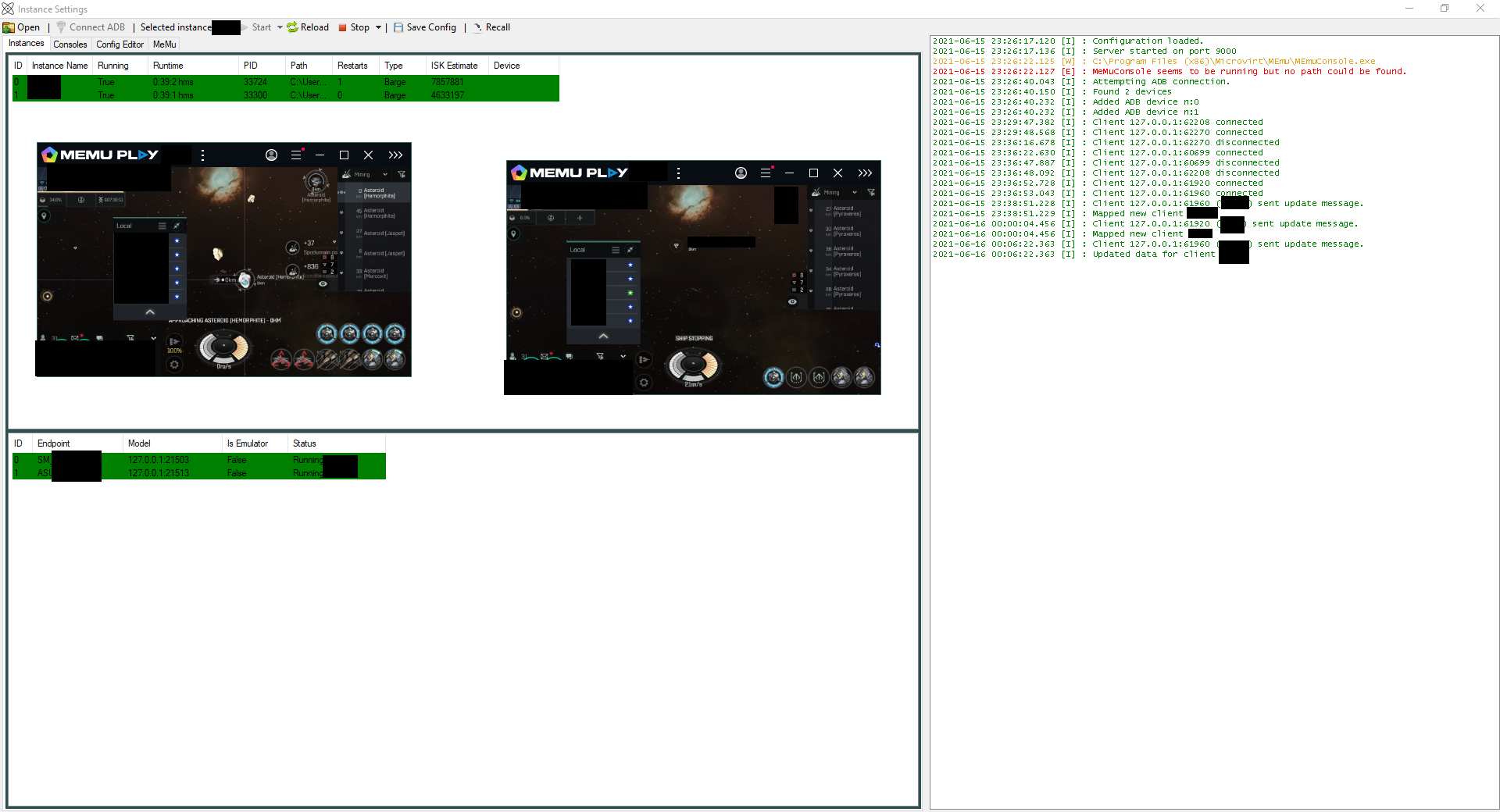
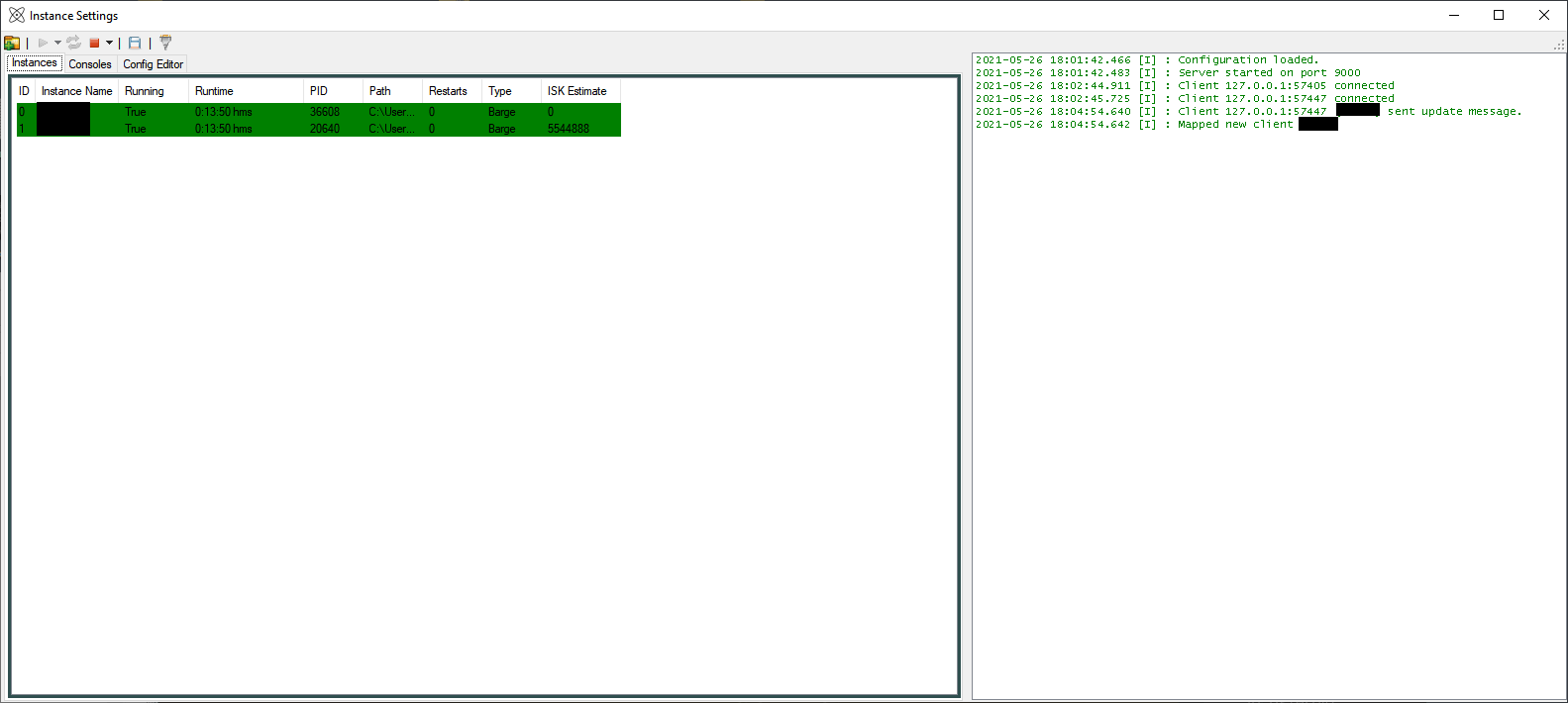
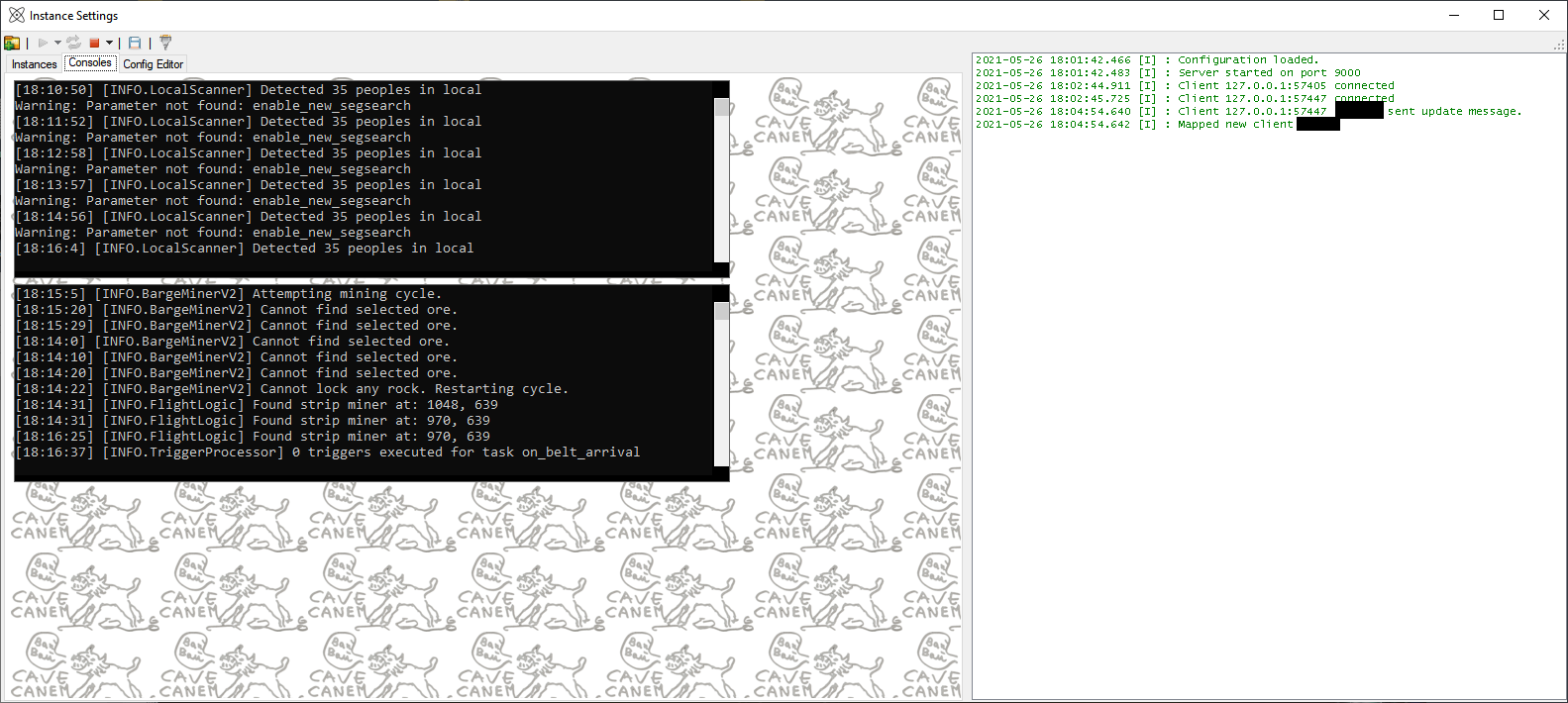
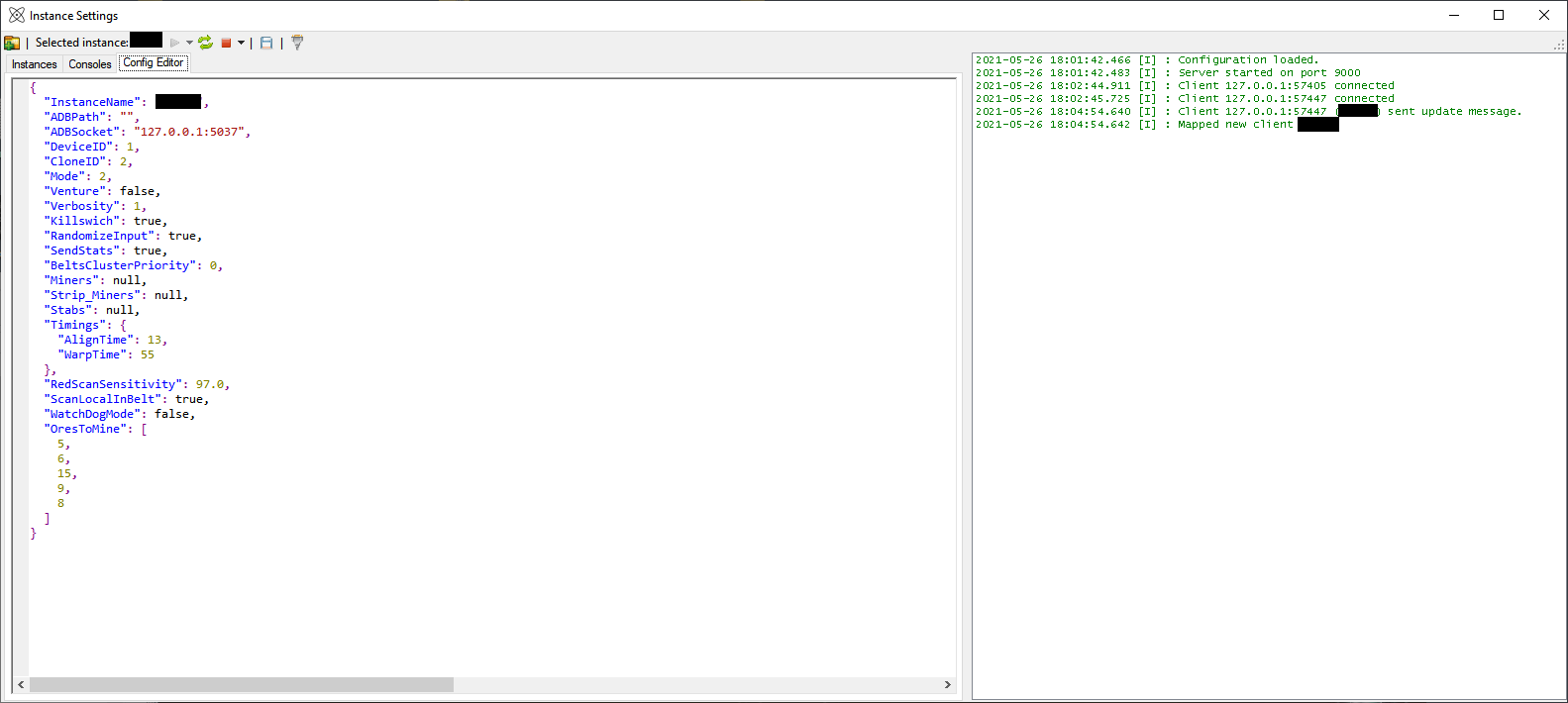
Instance Manager
bRnzepU.png


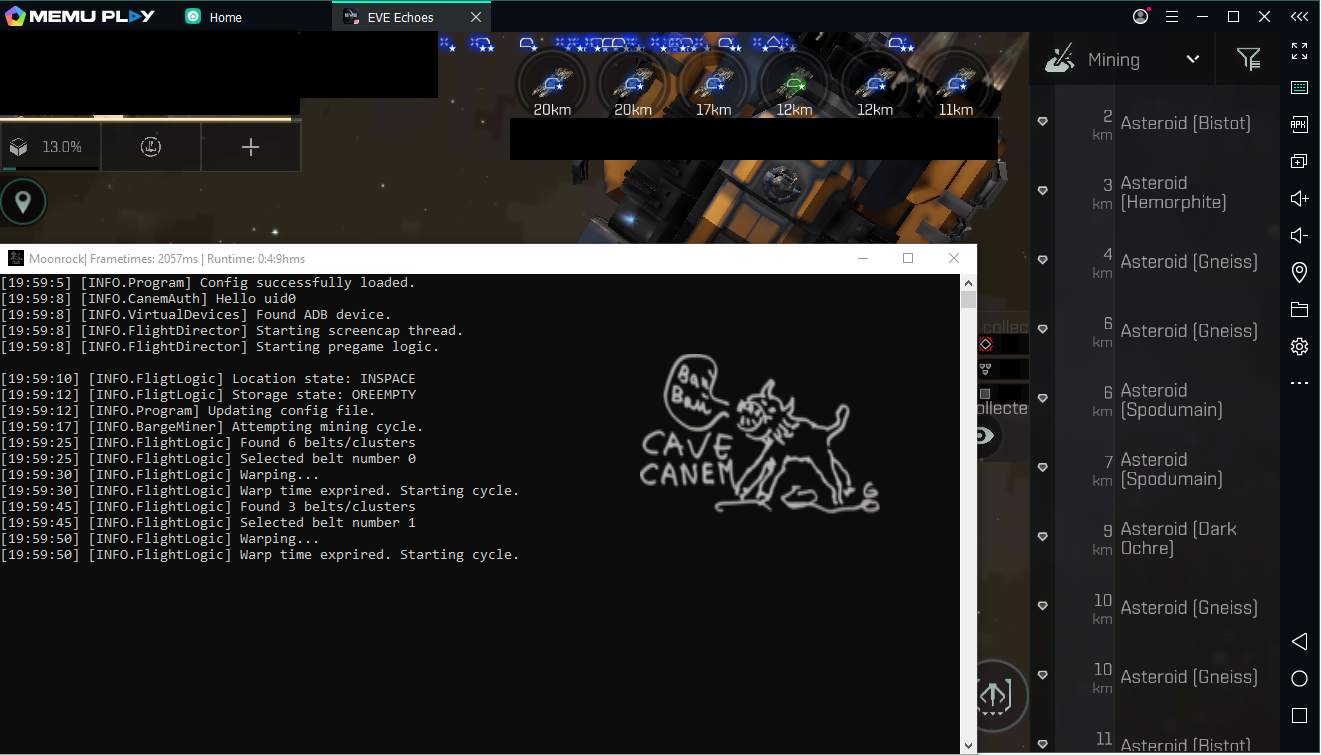
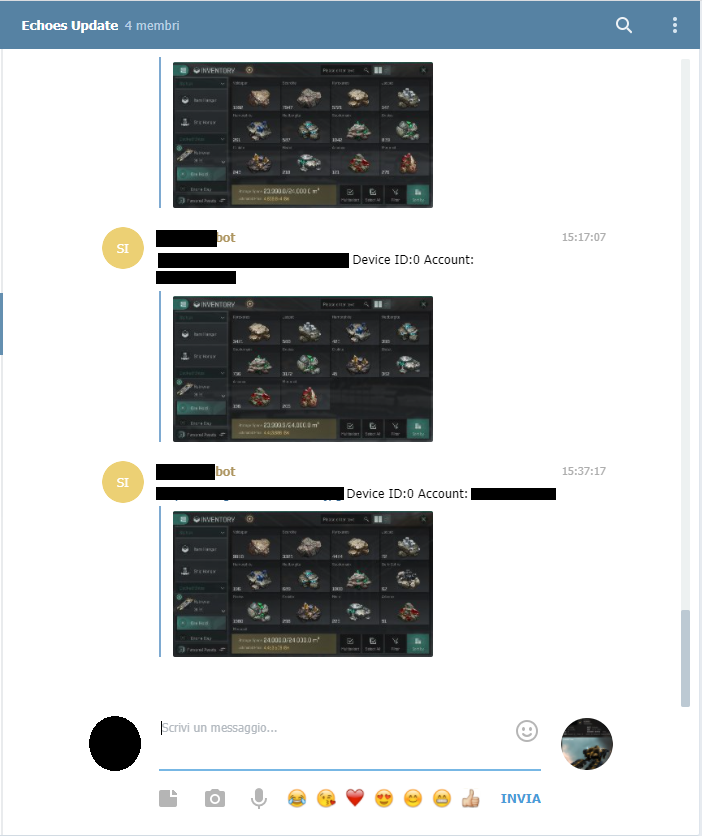
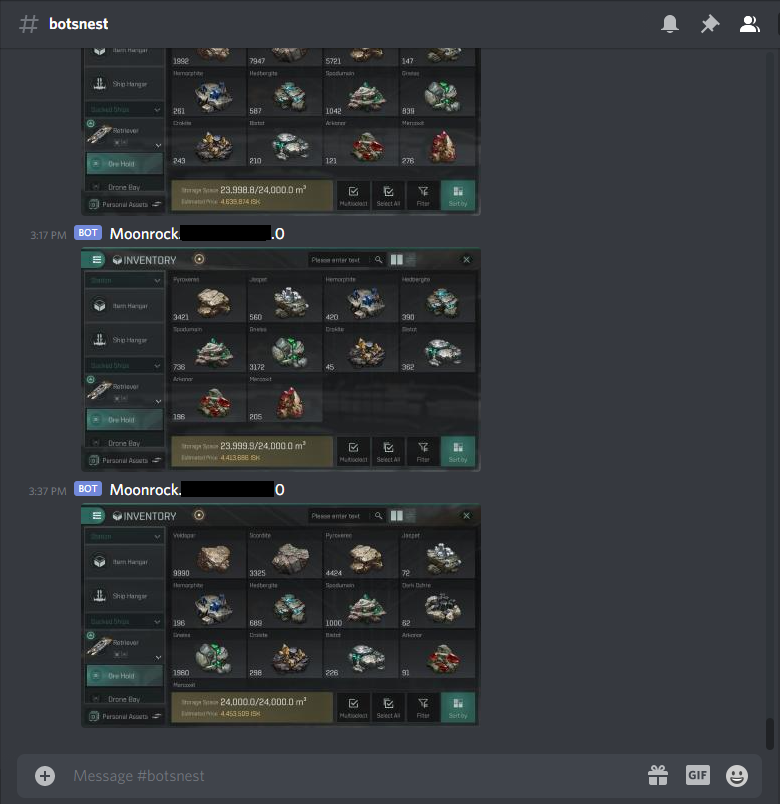
Bot Running StandaloneTelegram NotificationsDiscord Notifications
BhhIejD.png
CpZDXxQ.png
P5DicMy.png
 
Last edited:
CUSTOMER REVIEWS/QUESTIONS
hello is it still available and is it a single payment or do you have to pay a monthly payment?
 
1.0.8.6

Moonrock
  • Refactoring of most of the logic, removed unused code. Application is now smaller and less prone to memory leaks.
  • Added more checks as requested here, now the bot will permorm a scan when arriving in belt and has a small delay in the before unlock to check again for GCS.
  • A check is now performed when barge mining to address a bug where the bot would warp home but keep the mining routine on.
  • Small fixes here and there, nothing major.

Code:
1.0.8.6P1 fixes this issue https://cc.napalm.rocks/showthread.php?tid=204
 
1.0.8.5

Moonrock
  • You can now override all fixed coordinates by editing the coordinates.json file.
  • You can now override all fixed color schemes by editing colors.json.
  • You can now override all timings in a similar manner to how tolerances work, the bot will now display for how long is sleeping and why that sleep is required when set to Verbosity 3.
  • Updated some defaults regarding colors/coordinates.

Defaults (will be generated on first start):

colors.json
Code:
{
  "NetEaseLogo": {
    "X": 596,
    "Y": 263,
    "R": 230,
    "G": 0
  },
  "CinematicIntro": {
    "X": 616,
    "Y": 46,
    "R": 0,
    "G": 0
  },
  "MainMenuLogo": {
    "X": 736,
    "Y": 302,
    "R": 255,
    "G": 255
  },
  "CloneSelect": {
    "X": 176,
    "Y": 478,
    "R": 18,
    "G": 15
  },
  "RewardVideo": {
    "X": 1090,
    "Y": 115,
    "R": 159,
    "G": 147
  },
  "Undock": {
    "X": 1090,
    "Y": 238,
    "R": 159,
    "G": 147
  },
  "EyE_Unextended": {
    "X": 1230,
    "Y": 402,
    "R": 166,
    "G": 183
  },
  "EyE_Extended": {
    "X": 978,
    "Y": 404,
    "R": 169,
    "G": 185
  },
  "Inventory_Empty": {
    "X": 300,
    "Y": 650,
    "R": 16,
    "G": 18
  },
  "OreholdFull": {
    "X": 778,
    "Y": 650,
    "R": 19,
    "G": 20
  },
  "FirstAsteroidLocked": {
    "X": 936,
    "Y": 66,
    "R": 150,
    "G": 150
  },
  "FirstAsteroidLocked_alt": {
    "X": 936,
    "Y": 88,
    "R": 119,
    "G": 110
  },
  "FirstMinerOn": {
    "X": 1072,
    "Y": 631,
    "R": 178,
    "G": 227
  },
  "SecondMinerOn": {
    "X": 1148,
    "Y": 631,
    "R": 178,
    "G": 227
  },
  "ThirdMinerOn": {
    "X": 1226,
    "Y": 631,
    "R": 177,
    "G": 226
  },
  "OreHoldNotSelected": {
    "X": 190,
    "Y": 550,
    "R": 25,
    "G": 32
  },
  "Undock_Alt": {
    "X": 1244,
    "Y": 217,
    "R": 174,
    "G": 147
  },
  "FullShiled": {
    "X": 598,
    "Y": 577,
    "R": 249,
    "G": 249
  },
  "LocalWindow": {
    "X": 18,
    "Y": 587,
    "R": 123,
    "G": 147
  },
  "AstroidLock": {
    "X": 956,
    "Y": 67,
    "R": 149,
    "G": 147
  }
}

coordinates.json

Code:
{
  "ClientUpdate": {
    "X": 748,
    "Y": 473
  },
  "MOTDClose": {
    "X": 1138,
    "Y": 84
  },
  "StartGame": {
    "X": 648,
    "Y": 558
  },
  "FirstClone": {
    "X": 308,
    "Y": 279
  },
  "SecondClone": {
    "X": 636,
    "Y": 279
  },
  "ThirdClone": {
    "X": 972,
    "Y": 279
  },
  "SlowConnection": {
    "X": 710,
    "Y": 454
  },
  "Selector": {
    "X": 1158,
    "Y": 25
  },
  "MiningBelt": {
    "X": 1202,
    "Y": 556
  },
  "FirstBelt": {
    "X": 1174,
    "Y": 88
  },
  "Warp": {
    "X": 940,
    "Y": 180
  },
  "FirstRock": {
    "X": 1174,
    "Y": 163
  },
  "Lock": {
    "X": 924,
    "Y": 163
  },
  "Select_Mineral": {
    "X": 960,
    "Y": 51
  },
  "Approach_Mineral": {
    "X": 880,
    "Y": 215
  },
  "Inventory": {
    "X": 84,
    "Y": 107
  },
  "OreHold": {
    "X": 169,
    "Y": 554
  },
  "OreHoldSpace": {
    "X": 151,
    "Y": 278
  },
  "ExitInventory": {
    "X": 1234,
    "Y": 40
  },
  "CloseInventory": {
    "X": 1232,
    "Y": 40
  },
  "Station": {
    "X": 1168,
    "Y": 279
  },
  "Ships": {
    "X": 1120,
    "Y": 200
  },
  "TrustedPartner": {
    "X": 1148,
    "Y": 155
  },
  "Dock": {
    "X": 918,
    "Y": 167
  },
  "SelectAll": {
    "X": 980,
    "Y": 654
  },
  "MoveTo": {
    "X": 156,
    "Y": 150
  },
  "InventoryHangar": {
    "X": 440,
    "Y": 167
  },
  "FirstMiner": {
    "X": 1070,
    "Y": 666
  },
  "SecondMiner": {
    "X": 1142,
    "Y": 666
  },
  "ThirdMiner": {
    "X": 1220,
    "Y": 666
  },
  "StopShip": {
    "X": 466,
    "Y": 602
  },
  "PersonalAssets": {
    "X": 144,
    "Y": 681
  },
  "SetAsDestination": {
    "X": 750,
    "Y": 652
  },
  "SetAsDestination_Confirm": {
    "X": 498,
    "Y": 616
  },
  "MinimizeStation_Inventory": {
    "X": 144,
    "Y": 107
  }
}
 
1.0.8.4

Moonrock

  • JSON configration are now saved with identation for better reading.
  • Users can now override the coordinates of the locations menu to recall in station by setting
    Code:
      "OverrideHomeStation": {
        "X": 0,
        "Y": 0
      },

  • Users can now opt for a double scan of the local when REDs are detected. This setting should be used only if you get recognition issues due to black screens (ingame bug I cannot fix, reason unclear, seems a emulator render issue). This will perform another scan to confirm the detection, however if the next frame is also black this will not fix the issue.
    Code:
    "DoubleCheckRedScan": false
 
1.0.8.3

Moonrock

  • LocalScan has been reworked with the last game update; now the bot can detect neutrals. This system also reduces the time taking for the scan to happen.
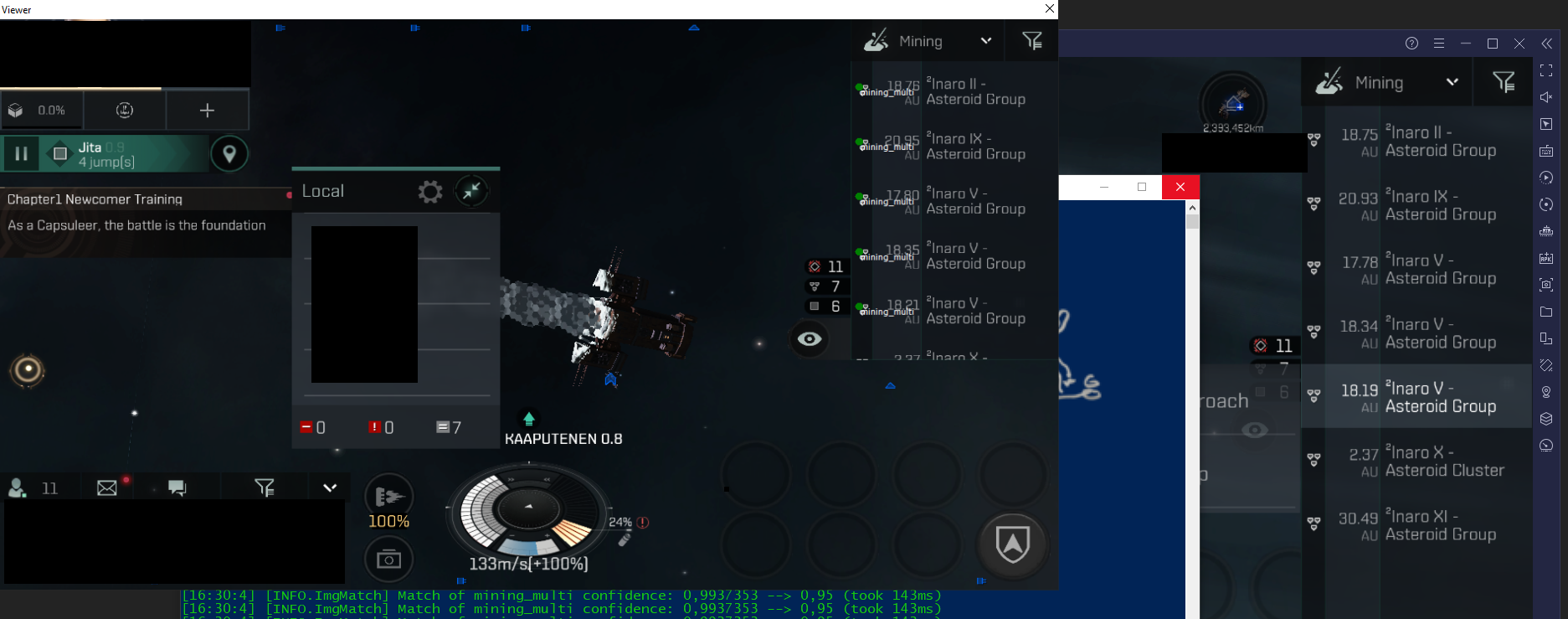
  • The bot has now a debug viewer to see what is happening with image recognition, this option can be enabled by passing --viewer as a console argument for debugging tolerances.
    5U4qPec.png
  • Image processing now has some additional filters to help with recognition.
  • Varius fixes from previous patches.
 
1.0.8.2

Moonrock

  • Local list is now scrolled to top by opening and cosing the menu as users suggested; I did not applied this method to the finder sidebar since it could lead to ingame "endless refresh" bug after a dozen of iterations.
  • Added configurable global contrast override for user who use the bot in systems with bright backgrouds; this setting can override the global contrast for image recognition.
    Code:
    "ContrastAdjustment":{"Enable":false,"Percentage":10}
  • [from preview 7] Randomization offset can now be configured in settings.
    "RandomizationOffset":{"min":0,"max":7}
  • Refactored Venture miner since it was not updated since 1.0.4.0.
  • Bot tries to avoid tapping inside the "This area has been spotted by other players message.
  • Some adjustements here and there regarding the OCR and the image analysis.

About the recognition issues:

Neteasy changed the transparencies in some menus; this can cause recognition issues when user is in bright systems (stars, planets, etc), conditions may vary. if you have recogniton issues, unless it's logics fault you might wanna try playing with the ContrastAdjustment setting, or retaking sample images adeguate to your system [feel free to ask]
 
1.0.8.0

Moonrock

  • Fixed a big detection issue causing the bot not recognizing certain features. This might be subject to changes, while logic has not changed much some additional checks and image manipulation where required. It's still not known why this issue is happening in the first place, probably a game bug.
  • You can now bind scripts to specifics emualtors.
    Code:
    -- run_on: on_gank
    -- author: uid0
    -- bind_to: AF732
    -- description: Taps specific coordinates on gank only on device AF732
    
    function moonrock()
    SendTap(1125, 575)
    SendTap(1150, 575)
    SendTap(1070, 575)
    SendTap(990, 575)
    end
  • GroundControl client settings are no longer stored in gcs.json, now you can find the GCS connection settings in each bot's config file, allowing the use of multiple systems or the exclusion of some.
    "ConnectToGCS":false,"GroundControlSocket":"127.0.0.1:9000"
  • Main script can now be defined in each config file.
 
1.0.7.9

Moonrock

  • Podcheck now also happens in dump screen.
  • Changed how OnlyApproachAsteroid works.
  • Fixed a crash on startup (this only happened to a few user that used VMs/PC with no LAN adapter).
  • Lowered minimum belts for warping away from 3 to 2.
  • PVEScanner is a bit faster but still to be considered very beta.
 
1.0.7.7

Moonrock


  • SendStats now allows users to save their stats (right now only accessible trough the image userbar), this setting is toggable using the SaveStats setting.
    You can acces your userbar at the following url:
    Code:
    https://cc.napalm.rocks/moonstats.php?user=YOURFORUMUSERNAME
    moonstats.php

    optionally you can change the color by specifying a hex color code (do not put the # sign before, in this example will be FAD02C):
    Code:
    https://cc.napalm.rocks/moonstats.php?user=uid0&color=FAD02C
    moonstats.php

  • New setting SendFullLocalScreenshot (defaults to false) enables sending of full game view instead of sending just the local view after a red detection.
  • New workaround for the endless "selector" search. I've replicated the issue in one of the debugging sessions and discovered that is not a bot bug but a game bug where the interface stop accepting tapts in that region. The fix is to close and open the selector view again. Now the bot will perform this action after too many failed attempts.
  • Fixed a bug with the delay time after red detection where the delay would only a few seconds.
  • Wrote again asteroid locking to works with less screencap calls and use pyramid search.
  • Reduced processing time is some detection routines.
 
1.0.7.6

Moonrock

  • Added PVEAssist mode, the bot will follow fleet commands. This is still work in progess and to be considered a beta feature. Enable it by setting PVEAssist as true in the config file.
  • Now the bot can select the device using the MODEL reported by android. This allows for mismached startup of instances, when the new setting ADBDeviceName is changed from "default" the bot will ignore DeviceID.
    You can change the model in MeMU by opening Settings -> Profile -> Device Model -> Options
  • The bot will now dump partial loads.
  • Processing time for template matching is now shown in Verbosity 3.
  • Local scanning is now faster, template matching there now uses pyramid search and the sample size has been reduced (by a lot). In the future all calls will use pyramid search when possible.
  • Delay in char selection has been incrased.
  • Some edits here and there to address some bugs (hopefully)
 
1.0.7.5

Moonrock

  • New setting ScanDelayAfterRecall for setting (in minutes) the maximum wait time after a recall before restarting scanning operations. This value is randomized, so if you set "3" the applicaiton will wait between 1 and 3 minutes before making a new attempt.
  • Bot now checks that the Locations menu is present before taking actions. Noramlly this is not an issue, but with the new mission banner it could trigger the interface.
  • Added more locations checks to prevent desync issues when recalling using GCS.


Instance Manager

  • You can now run consoles extrenally for easier debug.
  • More exception handling to prevent sporadical issues with ADB.
  • Added a manual recall button.

Updater
  • Added an updater for easier managment.
    You can download older (or beta, in the future) releases by running the updater with the following argument:
    Code:
    Updater.exe --version versionNumber
    (By default it will check for the latest release)
 
WARNING! Off-site contact information posted. Most scams occur off-site. Please contact members directly via EpicNPC chat. We do not investigate disputes if you communicate off-site.
1.0.7.4

Moonrock

  • New setting SendDumpNotification for disabling/enabling dump notifications over Telegram/Discord.
  • Fixed an issue with OnlyApproachAsteroids where the bot would not ScanLocal/Redock to dump hull.
  • Reduced the number of attempts to detect an empty belt from 6 to 3.
  • Stab activation is now delayed after calling for recall.
  • Damage detection is now performed on each stage of the mining process.
 
WARNING! Off-site contact information posted. Most scams occur off-site. Please contact members directly via EpicNPC chat. We do not investigate disputes if you communicate off-site.
1.0.7.3

Moonrock

  • Updated login API to reflect changes in the new forum software.
  • Changed threshold for filter_tag to 0.97.
  • Fixed a syntax issue in the Discord/Telegram red announcer that caused the bot to crash.
  • Fixed the sudden start/stops while in belt.
  • The bot will now dump it's hull after a recall (both by GCS and Solo scanning) even if the hull is not full yet.
  • New setting RescanDelayAfterGCSRecall for delaying the scanning process after a GCS flee order to prevent sudden undocks with reds still in system (this should not occur anyway if the recall is from the same system). Defaults to two minutes, can be disabled by setting the value to zero.
    Code:
  • Now the bot properly upgrades the config file after a version change.
 
WARNING! Off-site contact information posted. Most scams occur off-site. Please contact members directly via EpicNPC chat. We do not investigate disputes if you communicate off-site.
1.0.7.2

Moonrock

  • + New setting
    Code:
    OnlyApproachAsteroid
    changing how the bot (in Barge Mode) approaches the minerals. This will directly approach the mineral without locking onto it.
  • + New setting
    Code:
    SendRedNotification
    enables notification via Discord or Telegram with a screenshot of the detection. This also applies in watchdog mode and the LUA API.
  • + New setting
    Code:
    SendRedNotificationDelay
    defines in minites the delay when sending local screnshots to prevent spamming of the same alert, this defaults to 2 minutes.
  • + Fixed a rare bug where the bot would open the navigation menu while in station causing the bot to get stuck.
  • + Added a caching system for know positions and timings, this self adjusts on each run, so the bot does not have to scan certain areas of the game saving processing time.
  • + All actions are now displayed in Verbosity 3
 
1.0.7.0

Moonrock

  • + Fixed the loading of tolerance overrides (was caused by my obfuscator).
  • + Changed logic for no_asteroidChk, override should not be required for most clietns anymore.
  • + Changed how the bot detects an empty belt.
  • + Changed timing on how stabs are activaed during a recall.
  • + Venture mode works again.
 
1.0.6.10

Moonrock
  • + Verbosity 3 now shows what the bot is tapping or swiping for a easier debug.
  • + Fixed a bug that could cuse the bot to ignore the override system.
  • + Added a helper script for saving log and error log during debug without messing with the command prompt.
  • + Refactor still is in progress.
  • + Added a falback for checking distance in a belt.
 
1.0.6.9

Moonrock
  • + Changed venture miner logic to comply with updates (miner should be now trigger corretly).
  • + In Verbosity 3 the ImgMatching class will now higlight image detection results to help identify wrong detections.
  • + Fixed a bug in the tolerance override system that replaced all tolerances if the file had a wrong name in it.
  • + Started a big refactoring work.
  • + Preliminary support for custom OCR in LUA API (still wip).
  • + Updated some reference images.

Instance Manager
  • + Fixed some typos in the interface.
 
1.0.6.6

This is a small fix/stability update.

Moonrock
  • + RedScanSenitivity setting is now a float ranging from 0 to 1. Default value is now 0.97, this value changes the sensitivity on local red detection.
  • + Fixed another crash caused by GCS in Venture miner.
  • + Fixed an issue where the bot *could* get stuck in station thinking it was actively mining.
  • + Localscan will now scan only the bottom when out of station (or belt) and do a full scan when in station. This also applies to the LUA Api regarding local scanning.

1.0.6.7

Moonrock
  • + All scanning tolerances are now overridable via the "tolerances.json" file.

Let's say we want to override the filter_tag recognition tolerance from 0.95 to 0.97. Open the tolerances.json file and add an entry containing the name of the recognition step and it's tolerance.

Example:
Code:
[
{"Name":"filter_tag","Tolerance":0.97}
]

Multiple changes can be made:
Code:
[
{"Name":"filter_tag","Tolerance":0.97},
{"Name":"toggle_list","Tolerance":0.90}
]
 
1.0.6.5

Moonrock
  • + Fixed an issue where the bot would not correctly open the sidebar.
  • + Local opening&list view should now be more strict.
  • + Risk of bot not warping to belt should be now minimized again.

Instance Manager
  • + Added ADB Devices List/Status tab.
  • + Added button for recalling bots to base/test recall. Requires GCS server enabled.
  • + Now Instance Manager will show the status of MEmu VMs.
  • + Added button to grid and organize MEmu windows.
  • + Pressing on the VM ID in the MEmu tab will foreground the window of that instance.
 
Last edited:
O bitcoin, ill have to get some first.
 
You can use PayPal or Bitcoin (or any other mainstream crypto, Doge, ETH, etc). PayPal can be done through our forum directly, Crypto are handled manually. I believe that epicnpc supports Bitcoin via middleman.
Still available?
 
Yes! Slotted to 100 peoples maximum. We are not near the limit!
1.0.6.3 - Instance Manager Release
Moonrock
  • Full support for Instance Manager
  • New lua processor event "on_watchdog"
  • Fixed abnormal crashing behaviour
  • New lua functions for sending gank messages and scanning local
  • Fixed clone select in laggy environments
  • Improved belt detection to avoid wasting time in outer station
Instace Manager
The Instance Manager is a new tool for managing the bot, allowing to easily start, stop and reload multiple instances (also restarts crashed instances), in the future it will also used to manage the running bots using the Ground Control server (now integrated into the Instance Manager)
b6AWa2p.png
k5IPpC6.png
QHqlphg.png

LUA Functions

SendGankMessage: sends a retreat message to ground control server.
Return int (always 1).
Code:
SendGankMessage()  --> int

ScanLocal: scans the local list and return true if a red i present.
Return boolean
Code:
ScanLocal() --> bool
 
Would like to see a video of this bot in action. Setup and start of it working
 
Hello, only video I can send right now is a user made one, I've still not made a setup video/ A--->Z video.
1.0.6.0 beta
Moonrock
  • GCS client can now send more details (runtime, ISKEstimate, status). This will be expanded in the future.
  • Added more checks to the Clone Select page hopefully fixing recognition.
  • Instance Manager related changes.
Instace Manager
The Instance Manager is a new tool for managing the bot, allowing to easily start, stop and reload multiple instances (also restarts crashed instances), in the future it will also used to manage the running bots using the Ground Control server (now integrated into the Instance Manager)
b6AWa2p.png
k5IPpC6.png
QHqlphg.png
 
WARNING! Off-site contact information posted. Most scams occur off-site. Please contact members directly via EpicNPC chat. We do not investigate disputes if you communicate off-site.
1.0.5.0 - LUA Scripting
Moonrock
  • - Removed JSON based triggers
  • + LUA Interpreter: Moonrock now has a full scripting system using Lua. The scripts can run on triggers (like the old system) or you can start a main script that totally disables the normal procedures.
  • + Added more checks on Undock/Belt swapping
  • + Fixed a loop that could cause bot to get stuck in station after getting recalled by GCS
  • + Added two example LUA scripts (not on by default) for autostacking and toggling MWD on asteroid approach.

LUA API Functions

ImagePresent: Check if image is present on screen.
String: image path
Float: tolerance
String: common name (can be empty)
Returns boolean
Code:
ImagePresent(string, float, string) --> bool


FindImage: Find image on screen and returns coordinates.
If the image is not found the return output will be -1, -1
String: image path
Float: tolerance
String: common name (can be empty)
Returns coordinate table. X is [1], Y is [2].
Code:
FindImage(string, float, string) --> List<int>

FindMulti: Find images on screen and returns coordinates.
If the image is not found the return output will be -1, -1
String: image path
Float: tolerance
Bool: convert to grayscale image
String: common name (can be empty)
Returns coordinate table. X is [n][1], Y is [n][2].
Code:
FindMulti(string, float, bool, string) --> List<List<int>>

SendTap: Taps at given coordinates.
Int: X coordinate
Int: Y coordinate
Returns integer (always 1)
Code:
SendTap(int, int) --> int

SendSwipe: Swipes at given coordinates.
Int: Start X coordinate
Int: Start Y coordinate
Int: End X coordinate
Int: End Y coordinate
Returns integer (always 1)
Code:
SendSwipe(int, int, int, int) --> int

LogEvent: Sends a log message to console.
String: The message
Returns integer (always 1)
Code:
LogEvent(string) -> int

Sleep: sleep the execution for the provided milliseconds.
Int: milliseconds to sleep (1000 = 1 second)
Returns integer (always 1)
Code:
Sleep(int) --> int

CheckInSpace: checks if player is in space.
Returns boolean
Code:
CheckInSpace() --> Bool

OreHoldFull: checks ore hold is full.
Returns boolean
Code:
OreHoldFull() --> Bool

WarpAndDock: autopilot to station.
Returns boolean on completed operation.
Code:
WarpAndDock() --> Bool

SendWebhookMessage: send a message via Telegram or Discord webhook.
String: The message
Returns boolean on completed operation.
Code:
SendWebhookMessage(string) --> Bool

UploadScreengrab: capture and upload to Imgur a screengrab.
Returns the image link or the string "error" on a falied operation.
Code:
UploadScreengrab() --> string
 
1.0.4.5 - le fix update
Moonrock
  • + Fix to Venture miner.
  • + BargeMiner will now lock asteroids like Venture miner, no more ping pong folks ┐(‘~`;)┌ .
  • + New trigger event "on_belt_arrival".
  • + Bot will now resume crashed sessions.
  • + Fixed a stuck condition caused by a recognition issue.
  • + New helper script for connecting Bluestacks instances more easily.
  • + Reduced memory footprint.
  • + Changed/Updated reference images.
Ground Control Server
  • GCS will no longer eat 30% of your CPU usage after 2+ days of work. This issue has been fixed.
  • GCS will now also show days of runtime.

Bluestacks Helper Script
I've added a Powershell script for starting and connecting the bot to bluestacks with less hassle, to use the script create one directory per each instance named with the port number given by bluestacks.

For example if your instance port are 5555, 5565, 5575 you will have to create these three directories in the config folder.
After starting the script for the first time the bot will create the config files, close the bot, edit the config and restart.
 
1.0.4.0
  • + Added back Venuture mining (user requested, needs additional testing).
  • + Bot now scans local instead of ships in belt (can be disabled).
  • + Added Ground Control Server to connect multiple instances and share local status.
  • + Multiboxing is now easier, Moonrock can load config files trough the --instance parameter. Using the "start_multi" batch file will create config files in the "config" directory.
  • + Bot will scan local before undocking.
  • + StripMiners, Miners and Auras will be detected on first boot. User can override this option trough config.
  • + Added Watchdog mode. Watchdog mode will only scan local checking for reds without undocking, this mode is intended to be used with the Ground Control Server.
  • + Some fixes here and there.
  • + New trigger event "on_approach_asteroid"

Ground Control Server

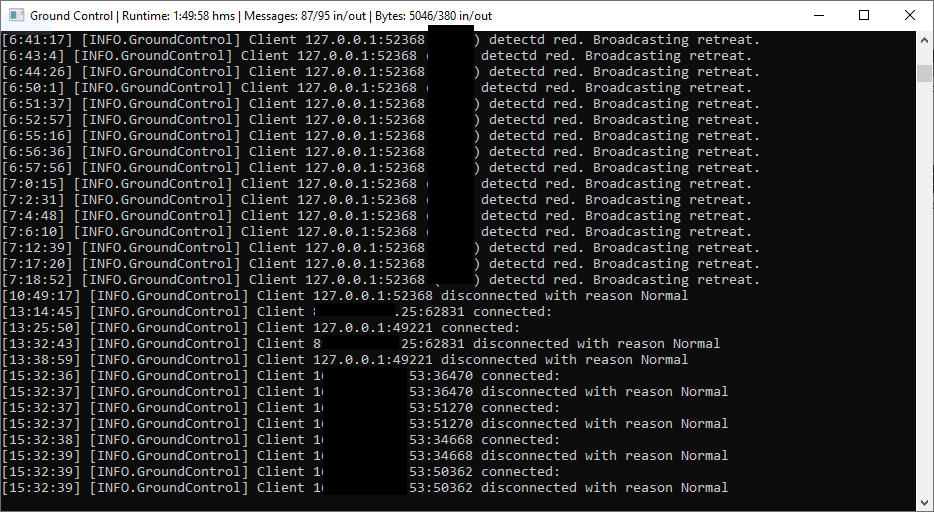
Ground Control Server is a TCP server aimed to connect multiple bot instances. In the future it will be used to manage and orchestrate multiple bots at the same time. In the current release it can share the local status between the bots, this meas that if one bot detects (or gets ganked) the server will broadcast a retreat command to all connected clients. You can even let a friend connect to it as long you port forward the server. For more infos check the wiki.

me3sxhf.png
 
WARNING! Off-site contact information posted. Most scams occur off-site. Please contact members directly via EpicNPC chat. We do not investigate disputes if you communicate off-site.
1.0.3.5

  • + Input is randomized by a few pixel each tap. (new setting "RandomizeInput" see this for more infos)
  • + Moonstas! Moonstat is a public report, the client only sends the cycle time and it's isk estimate. You can always disable this in the settings. (new setting "SendStats" see this for more infos)
  • + More detailed Telegram/Discord notification now including total cycles, time and total isk farmed in the session.
  • + Fixed some bugs here and there.
  • + Moonrock.Configurator has been removed and now it's included in Moonrock. Use the batch file to start in configuration mode.
  • + Update checker and MOTD.
  • + Bot will alert when the emulator is performing poorly (frametime > 5000ms)

cgcGOKC.png
 
WARNING! Off-site contact information posted. Most scams occur off-site. Please contact members directly via EpicNPC chat. We do not investigate disputes if you communicate off-site.
1.0.3.0

  • + Fixed dumping in Citadels
  • + After a gank the bot will send a Discord/Telegram notification with a screenshot of the ganker.
  • + User can select where to mine (only belts, only clusters, both). (new setting "BeltsClusterPriority" see this for more infos)
  • + User can make custom triggers, see this thread for more informations.
  • + Updated the Moonrock Configurator to include a coordinate finder.
  • + Moonrock Configurator will now connect to the specified address/adb path/device id in the config.
  • + Fixed abnormal undocking
 
Last edited:
S
How hard for me to just turn it on crank a bunch of instances and let it do it's thing?
Back
Top