Impostor Prevention
These small tips will help prevent most impostors from taking advantage of you:
Tip #1: Copy/Paste. If you are trying to get in contact with a user who has a complicated AIM name (I do this with even the simplest of AIM addresses), always copy/paste their AIM address from their signature to the "Add Buddy" menu. This can prevent you from accidentally misspelling the address and contacting the impostor themself! That just makes their job 10x easier.
Tip #2: Use the new Profile links. As you may have noticed, there is are IM buttons beneath the profile of users who have registered their Instant Messenger addresses to their account. If you click the button and hit the "Send [username] a message," you will be automatically entered into a chat with the user you are trying to talk to. If you are going to use this function, I recommend that you always take a screenshot of the little box for proof in the future that the IM address was registered to the specific user.
Example:
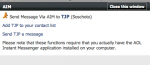
Tip #3: If contacted by a user directly, always verify who they are. My personal methods for doing so are as followed: I first begin by looking up the user's profile on the forums. I then find their IM address associated to it, and do a quick Copy/Paste or click of the IM button, and open a new chat with the user. If the user who contacted me was indeed the real person, a new chat window should not pop up. Regardless if a new chat window pops up, you may wish to use the new chat window, knowing you are in fact speaking with the correct person.
Tip #4: If a user contacts you claiming to be a specific person on the forums, have them verify it via PM or thread post. Ask them to post a *secret word* (I'll explain why in a moment†) such as "Penguin," "Car," "Fruitloop," etc. in a Private Message or a thread post on one of your threads. This is a key and priceless technique to verifying who you are talking to.
† - I added this footnote to explain the reason behind a secret word. This is where impostors become incredibly deceptive, when they are able to successfully prove to the person that they are someone else, when in reality they aren't. The most common example is done via IM to the user being imposed. The impostor will go on a separate IM address and talk to the user they are imposing, asking them to "bump" the thread of a victim. If the user being imposed is careless, and they bump the thread, now the impostor has shown via post that they may be who they say they are. The victim, who is lead to believe that the impostor is actually the person, is then taken advantage of. If you ask for a secret word, it is much harder for an impostor to ask a person to randomly post or PM "Penguin" or any secret word for that matter, other than "Bump," which is standard.
**If you are asked to bump another user's thread, and you have NO idea who the user is, ignore them and report it to the administration team**
Tip #5: Font is your best friend. Let's say MaIicious decided to give you an IM and wants you to believe they are Malicious. They are using a font, such as the one shown above to come out with an AIM address: "MaIicious". But wait... this AIM address is actually "MaIicious," with the "I" altered to look like a lower-case "L". Who would notice such a peculiar little effect? Well, here is the answer to this problem. While font seems to be the tool of deception, it is also the tool of clarity. Copy/Paste the fake address ("MaIicious" in this case) and take it to a word document. Size it up large, make it really visible, and then change the font several times to carefully examine that each letter represents what it looks like. You may end up with this:
"MaIicious"
It is clear that you have encountered an impostor. And by simply using the font tool, you were able to catch what you couldn't see before with the naked eye. My personal favorite font is "Times New Roman" since the letters (especially when sized up) are very clear and easy to differentiate.
Taken from
http://www.epicnpc.com/threads/376990-*Preventing-the-Most-Common-Scam-Methods*


