


vitalic

| EpicMember Upgrade A member that has upgraded their account. |
- Rating
- 5.00 star(s)
- Country
- Not Phone Verified
- Multiple Accounts
- 0
Trade Guardian Orders: 6
Total Feedback: 6

[video=youtube;uhWLLuNQjwI]http://www.youtube.com/watch?v=uhWLLuNQjwI[/video]



Overview:
- Honorbuddy Combat Routine:
- High level Rogue PvP combat routine for Honorbuddy
- Includes an ultra light-weight botbase to use with the routine, other rotation bot bases like Enyo supported.
- Fully updated for Legion Season 1 and Patch 7.0.3.
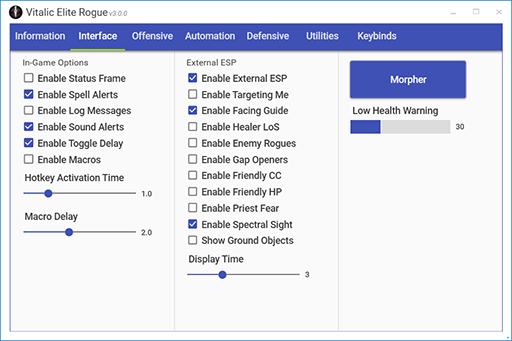
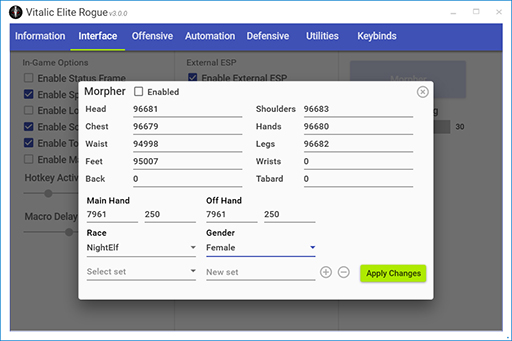
- New: Includes built-in 32-bit Morpher Dominate your enemies in style!
- Multi-spec / All Languages:
- Currently supports Subtlety, Assassination and Outlaw!
- Supports all client languages
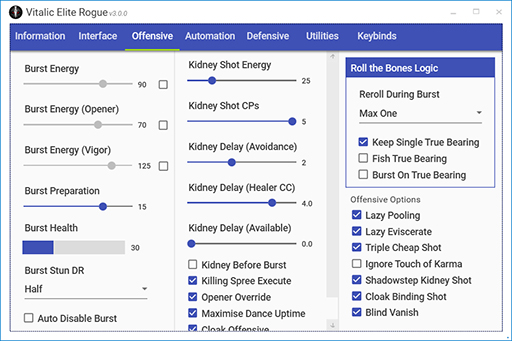
- Burst Mode + Lazy Mode
- Performs perfect/optimal burst rotations
- Completely flexible, open on a target with Garrote or Cheap Shot, with Subterfuge or Shadow Focus and the rotation will adapt accordingly.
- Uses burst cooldowns, DPS trinkets, offensive racials
- Lazy mode automates your basic damage rotation with smart combo point management
- Advanced keybind and macro support:
- Easily configurable hotkeys, supports almost any key combination
- Sticky keybinds allow you to press a bind once and have the ability be spammed for a configurable period of time as you approach your target
- Visual on-screen and audible spell use alert system:

- Custom alert system using the Buddy Overlay, with animations and spell icons for key events
- Plays sound when an event occurs or you interrupt someone, audible warnings if enemy is on diminishing returns
- Can be enabled/disabled in the configuration, also possible to stream/record without being visible
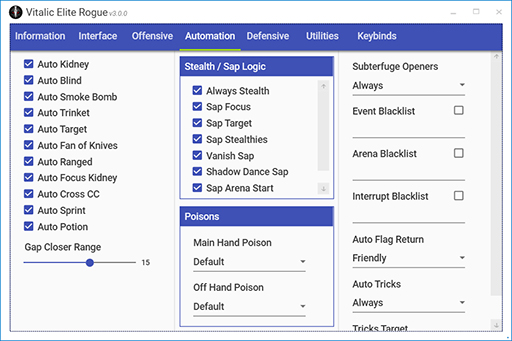
- Original and powerful utility features:
- Auto Blind Intelligently casts Blind on enemy healers in arena at the best time or on an enemy DPS as a last-ditch attempt to save a teammate
- Auto Focus in all arena brackets and BGs/RBGs Too lazy or forgetful to set your focus target in arenas? Let the profile do it for you!
- New: Interrupt Tracker Tracks successful interrupts on enemies and adapts the rotation accordingly, for example casting a Kidney Shot right before the lockout on the target ends for maximum CC duration
- Peel Mode Enable the peel mode hotkey to concentrate on CCing any nearby enemies, also increases Feint/Recuperate priority for maximum survivability if being targeted/taking damage
- Auto Interrupt High level interrupt logic, Kicks the right things at the right time, pre-configured spell lists, no setup required!
- Sap + Blind stealthed targets in duels, battlegrounds and arenas Instant event driven Saps, Saps before you can even see the target!
- Auto Cross CC In arena the routine can control one enemy DPS while bursting the other, making it easier for your team to CC the enemy healer
- Feign Death/Mirror Images/Shadowmeld re-targeting Tired of having to click/tab target after a Hunter uses Feign Death? The profile will instantly re-target them and sometimes the Hunter will sit in Feign Death while you pump damage into them! Will also re-target enemies that use Shadowmeld.
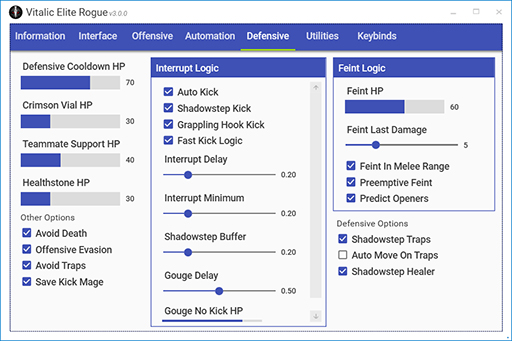
- Auto Shadowstep/Grappling Hook Responds to enemy spells and gap openers within a fraction of a second (Blink, Displacer Beast, knock-backs like Shaman Thunderstorm, looks like you have crazy fast reaction time!) Also able to automatically close gaps by casting Shadowstep or Grappling Hook automatically at a certain distance when running towards your target.
- Advanced defensive cooldown usage Uses Evasion and Riposte during enemy cooldowns
- Advanced Feint usage Uses Feint when enemies cast dangerous spells or when you are below a certain HP, with numerous configuration options
- Anti-Juke logic Detects enemy casters trying to juke you, after a random number of jukes are detected the next cast will be fast interrupted. Numerous other contextual fast Kicks, for example after trinketing.
- Smart re-stealthing Tracks DoTs that have been applied to you and avoids casting Stealth if you will get knocked out
- Teammate Support Will detect when a teammate is at low health in arena and try to automatically peel the enemy team using Cheap Shot, Garrote, (Shadowstep) Kick, Gouge, Shiv Crippling or Kidney Shot on any enemies in range
- Gladius synced DR Tracker The routines internal tracking of diminishing returns mirrors that of the popular Gladius addon and so it should always be possible to know the DR state of the routine
- Queue Alerts + alt-tab detection Will detect if you have alt-tabbed out of the game and will play an audible sound alert when an arena or battleground queue pops
- Extra-Sensory Perception (ESP) Uses an external 3D overlay to allow you to see the location of Hunter traps and flares, whether you are behind the target making it easier to maintain good positioning, which enemies are trying to attack you, or indicating when you are LoSing your healer in arena.
- Arena 1-5 Kick/Gouge The profile is able to interrupt targets that you do not have either targeted or focused in arena matches, for example you can walk past a Warlock casting Fear and interrupt them without needing to target them
- Focus Sap out of combat targets automatically
- Other features:
- Interrupt management Enable/disable automatic interrupts via hotkey, Kick Next Heal/CC + Fast Kick hotkeys
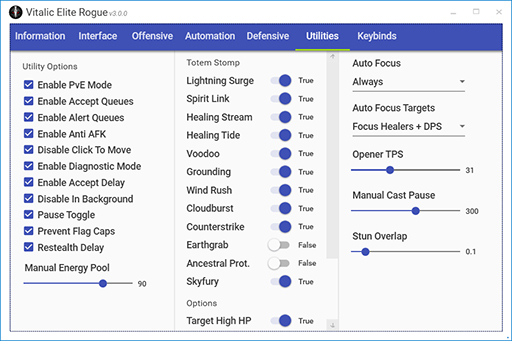
- Automatic Totem Stomp Allows you to configure which totems to automatically target and destroy
- Auto flag + cart return in Battlegrounds/Rated Battlegrounds
- Auto accept Battleground/Arena queues
- Auto accept ready checks/role checks (100% AFK RBG queues)
- Manual cast pause Allows you to cast spells manually without the routine spamming spells
- Set a dynamic TPS value when opening on a target for more responsive openers on moving targets
- Knows when your character is about to exit combat and will stop attacking to try and re-stealth




Buy Standard Edition (20 GBP)
Buy Enhanced Edition (Skype + TeamViewer support, 30 GBP)
Purchasing instructions:
Buy Enhanced Edition (Skype + TeamViewer support, 30 GBP)
Purchasing instructions:
- After purchasing please send me an email stating your desired email address and username, this will be used to send out future updates.
- You will then receive an email with download details, I aim to fulfill all orders within 20-30 minutes (timezone permitting).
Questions? Contact me via Discord or email.

- Opening Use either the Garrote or Cheap Shot hotkey to tell the rotation you are ready to open, it will then initiate combat once you are in melee range. As Subtlety it may automatically cast Symbols of Death as you approach the target.
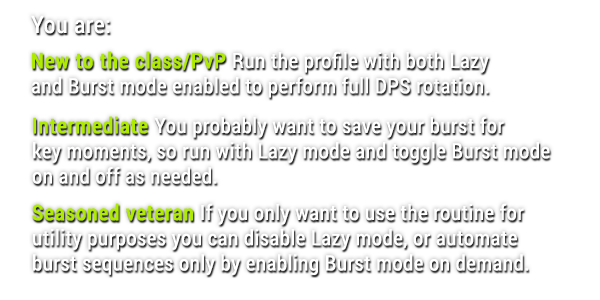
- Burst mode Burst mode can be toggled on and off (default Left Alt) and if your burst cooldowns are available it will use them, assuming the burst conditions (diminishing returns, energy etc.) have been met.
- Lazy mode Lazy mode can be toggled on and off (default Right Shift) depending on whether you want the profile to handle your basic damage rotation.
- Other openers If you manually cast Marked for Death from stealth the routine will open with Kidney Shot / Between the Eyes.

Set up your hotkeys in the GUI, example binds are shown below. You can unset a bind by pressing the Escape key:
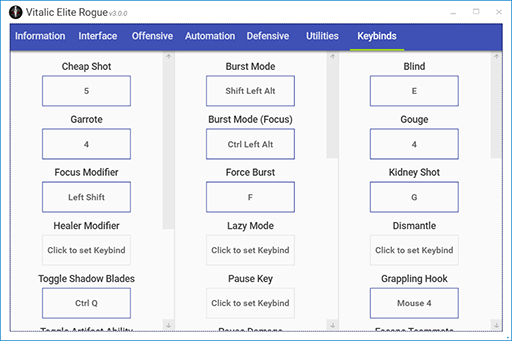
It's also possible to use the various in-game macros (requires enabling macros in the Interface tab), these provide an alternative way to queue abilities to be casted by the rotation.
Opener macros:
Special ability macros:
Advanced macros:
Spell toggle macro (queue a specific spell to be cast by the rotation):
Blind macro with specific target (i.e. /blind arena2):
Gouge macro with specific target (i.e. /gouge mouseover):
Fast Kick macro (makes your next interrupt as fast as possible):
General macros:
Killing Spree macro (it is important to use this macro when casting Killing Spree manually if playing with the Venom Rush talent):
#showtooltip Killing Spree
/cancelaura Blade Flurry
/cast Killing Spree

Changing settings
To change profile settings, simply click "Class Config" within Honorbuddy, this will bring up the GUI.
Tips and tricks:
- Any setting which is altered with a slider bar can be disabled (if disabling is supported) by moving the slider all the way down to 0
- Any of the slider bars can be changed in small increments with your mouse wheel after hovering over them
- When modifying a keybind you can clear/reset the keybind by pressing the Escape key
- There are no save or apply buttons! Settings changes are made on the fly and will be active as soon as you switch back to the game
- Reset and export settings buttons will be added in the near future
Troubleshooting:
What should you do if you experience a problem running the profile?
- If you get the keyfile is missing error on loading Honorbuddy, make sure the keyfile that was attached to your original email is placed in the Routines/VitalicEliteRogue folder, also make sure your email client hasn't renamed it (the file should have no extension).
- The initial step when experiencing a problem while running the routine should be to enable Diagnostic Mode in the class config (utilities tab), if the problem occurs again stop Honorbuddy and then either create a bug report with a diagnostic log attached or email me the log file directly. How to send a log file.
- Try restarting Honorbuddy and WoW, then try a full reboot of your machine.
- Try a fresh install of Honorbuddy with just this routine.
- Try clearing your WoW/HB caches in case you have a cache corruption (info here).
- Try wiping your settings file from the Settings/Vitalic folder inside your Honorbuddy directory in order to reset to defaults.
- Ensure you don't have any of the software that is known to conflict with HB running. This can cause issues with hotkeys and manual cast pause, certain Logitech/Razer software can also cause problems.
- If you have any issues with the overlay features (i.e. status frame or notifications not appearing), or the bot is refusing to start with a Desktop Composition error, ensure Desktop Composition is enabled, your graphics drivers are updated and if using Windows 7 that the Aero theme is selected.
- If having any issues with the External ESP feature refer to the ESP troubleshooting tips.
- If experiencing any issues with hotkeys or the routine not performing its rotation: install both the x86 Visual C++ 2010 redistributable and x64 Visual C++ 2010 redistributable (the latter if using a 64-bit version of Windows), ensure that you have the latest .NET Framework installed, then reboot your machine.

Please note: as is commonplace for this kind of thing, purchase of the combat routine is subject to fair usage policy (see below). The routine features an automatic update/hotfix system which initiates an http request each time the routine is initialised, those connections are logged in a secure cloud database. Obvious breaches of the fair usage policy may result in a warning email and eventually account termination.
Fair usage policy:
- Okay: using on multiple computers from the same IP address
- Okay: sharing with a trusted friend (please be kind and ask them to donate if they like it)
- Okay: multiple simultaneous connections from the same IP address
- Not okay: sharing with lots or multiple people

Last edited:


There is no best spec, depends on what you prefer, all are viable in PvP although combat perhaps easiest for beginner